> ## Documentation Index
> Fetch the complete documentation index at: https://docs.coze.cn/llms.txt
> Use this file to discover all available pages before exploring further.
[画质提升插件](https://www.coze.cn/store/plugin/7438834453352529946)用于提升图片的画质,支持增强 4 倍清晰度。你可以使用该插件对模糊或低清的图片进行处理,使图片呈现出更加清晰、细腻的效果。
## 使用限制 {#9b731d9e}
扣子主账号内所有子账号共享**画质提升插件**的并发限制 ,其值为 4。
## 计费说明 {#8bfa2cca}
画质提升插件根据插件调用次数计费,对应的计费项及单价请参考[插件费用](/coze_pro/plugin_fee)。
## 配置说明 {#8cb0e64f}
画质提升插件包含 image_quality_improve 工具。调用该工具时,你需要上传原始图片。
### 输入参数 {#c34b8ad8}
输入参数说明如下表所示:
| | | \
|**参数** |**说明** |
|---|---|
| | | \
|原图 |设置原图来源,必填参数。 |\
| |支持上传图片或引用上游节点的输出参数。 |\
| |:::tip 说明 |\
| |在调试节点效果时,建议上传一张示例图,用于调整参数配置,并仅测试该节点,快速查看效果。 |\
| |::: |
### 输出参数 {#7ef219d6}
| | | \
|**参数** |**说明** |
|---|---|
| | | \
|data |画质提升后的图片链接。URL 有效期为 30 天,请及时转存。 |
| | | \
|msg |执行插件时的状态描述或错误提示信息。 |
## 示例 {#ab645c36}
在工作流中调用画质提升插件,提升图片画质。
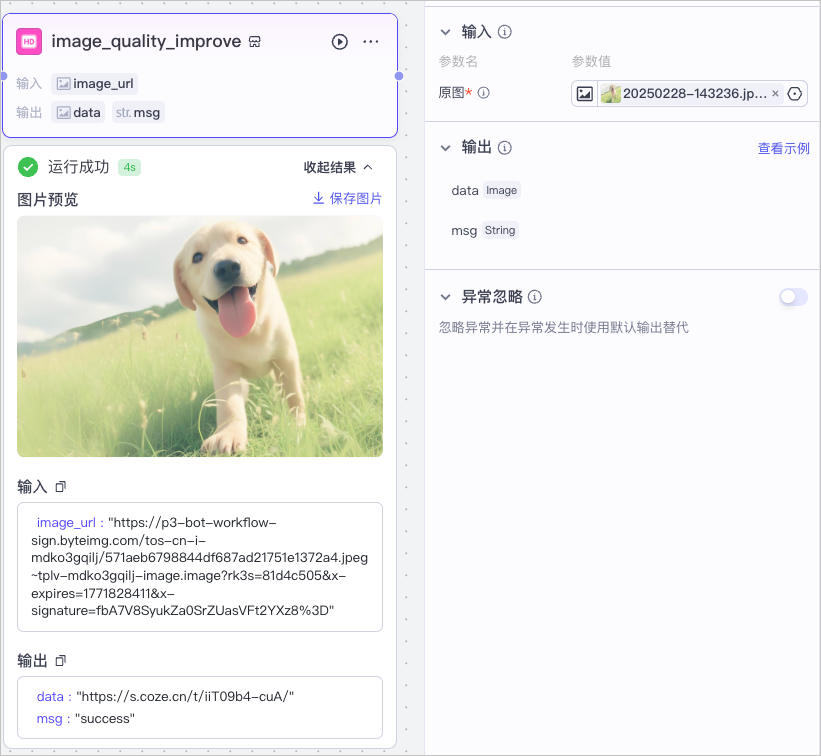
效果如下:
::::cols
@col 50
原始图片
@col 50
画质提升后的图片
::::
> *画质提升插件 ID:7438835880728526898