
Google ADK
复制页面
本文介绍如何使用 OpenTelemetry 协议将 Google ADK(Application Development Kit)运行过程的 Trace 数据自动上报到扣子罗盘。
Google ADK 是一个灵活且模块化的框架,用于开发和部署 AI Agent。通过与 OpenTelemetry 集成,能够自动捕获 Google ADK 运行过程中的关键操作和性能指标,并将这些信息作为 Trace 数据上报到扣子罗盘,完成可视化分析。本集成方案适用于需要监控 AI Agent 运行性能、排查模型调用延迟或工具交互问题的场景。
本文以 Python SDK 为例,介绍如何通过 OpenTelemetry SDK 将应用程序的 Trace 数据上报至扣子罗盘平台,从而实现对应用程序性能和行为的高效监控与分析。
使用 OpenTelemetry Python SDK 前,需要先安装 Python SDK 以及相关的依赖库。
安装 Python SDK。
Opentelemetry Python SDK 要求 Python 3.9 或以上版本。你可以通过如下方法查看 Python 版本。
# 查看 Python 版本
python --version

# 回显信息显示已安装 3.9.2 版本
Python 3.9.2
安装依赖库。
安装 Python 依赖库,分别用于调用 AI 模型、对调用过程进行可观测性管理以及将 Trace 数据导出到后端系统。
pip install openai
pip install opentelemetry-sdk
pip install opentelemetry-exporter-otlp
pip install openinference-instrumentation-google-adk
pip install google-adk
在上报 Trace 数据前,你需要正确配置 OpenTelemetry 的环境变量,以确保 Google ADK 应用能够正常调用 OpenAI 模型,并能正确发送 Trace 数据到指定的扣子罗盘空间中。环境变量配置格式及说明如下:
OTEL_EXPORTER_OTLP_HEADERS=cozeloop-workspace-id={CozeLoop空间ID},Authorization=Bearer {个人访问令牌或服务访问令牌}
OTEL_EXPORTER_OTLP_TRACES_ENDPOINT=https://api.coze.cn/v1/loop/opentelemetry/v1/traces
GOOGLE_API_KEY=***
|
环境变量 |
说明 |
|---|---|
|
OTEL_EXPORTER_OTLP_HEADERS |
设置上报数据时所需的扣子罗盘认证信息和工作空间标识。包括如下参数:
|
|
OTEL_EXPORTER_OTLP_TRACES_ENDPOINT |
指定 OpenTelemetry 数据的上报地址,固定为 |
|
GOOGLE_API_KEY |
配置 Gemini 模型的 API Key。获取方式请参考 API Key。 |
完成上述配置后,可使用 Gemini 模型调用 AI 对话,并通过 OpenTelemetry Python SDK 上报 Trace 数据到扣子罗盘。以下示例将分别展示自动上报 Trace 数据与上报自定义 Span 节点数据的具体实现方式。
在本示例中,Google ADK 框架基于 Google Gemini 模型,创建了一个能回答城市天气和时间的智能体,并通过 OpenTelemetry SDK 自动收集和上报模型调用、工具使用、会话管理等交互过程的 Trace 数据到扣子罗盘,从而实现对模型调用过程的全面监控和分析。
说明
使用 GOOGLE_API_KEY 时,需要置为 US 地区网络。
import datetime
import os
from zoneinfo import ZoneInfo

from opentelemetry import trace
from opentelemetry.sdk.trace import TracerProvider
from opentelemetry.sdk.trace.export import (
    BatchSpanProcessor,
)
from opentelemetry.exporter.otlp.proto.http.trace_exporter import OTLPSpanExporter
from google.adk.agents import Agent
from google.adk.runners import Runner
from google.adk.sessions import InMemorySessionService
from google.genai import types

# Gemini API Key (Get from Google AI Studio: https://aistudio.google.com/app/apikey)
os.environ["GOOGLE_API_KEY"] = "***" # your google api key

# OTEL env
os.environ["OTEL_EXPORTER_OTLP_TRACES_ENDPOINT"] = "https://api.coze.cn/v1/loop/opentelemetry/v1/traces" # cozeloop otel endpoint
os.environ["OTEL_EXPORTER_OTLP_HEADERS"] = "cozeloop-workspace-id=***,Authorization=Bearer ***" # set your 'spaceID' and 'pat or sat token'

# OTEL configuration
otlp_exporter = OTLPSpanExporter(
    timeout=10,
)
trace.set_tracer_provider(TracerProvider())
trace.get_tracer_provider().add_span_processor(
    BatchSpanProcessor(otlp_exporter)
)
tracer = trace.get_tracer(__name__)

# Import and configure the automatic instrumentor from OpenInference
from openinference.instrumentation.google_adk import GoogleADKInstrumentor
GoogleADKInstrumentor().instrument()


def get_weather(city: str) -> dict:
    if city.lower() == "new york":
        return {
            "status": "success",
            "report": (
                "The weather in New York is sunny with a temperature of 25 degrees"
                " Celsius (77 degrees Fahrenheit)."
            ),
        }
    else:
        return {
            "status": "error",
            "error_message": f"Weather information for '{city}' is not available.",
        }


def get_current_time(city: str) -> dict:
    if city.lower() == "new york":
        tz_identifier = "America/New_York"
    else:
        return {
            "status": "error",
            "error_message": (
                f"Sorry, I don't have timezone information for {city}."
            ),
        }

    tz = ZoneInfo(tz_identifier)
    now = datetime.datetime.now(tz)
    report = (
        f'The current time in {city} is {now.strftime("%Y-%m-%d %H:%M:%S %Z%z")}'
    )
    return {"status": "success", "report": report}


async def main():
    # set custom span
    with tracer.start_as_current_span("root_span") as span:
        span.set_attribute("cozeloop.span_type", "custom")

        agent = Agent(
            name="weather_time_agent",
            model="gemini-2.0-flash",
            description=(
                "Agent to answer questions about the time and weather in a city."
            ),
            instruction=(
                "You are a helpful agent who can answer user questions about the time and weather in a city."
            ),
            tools=[get_weather, get_current_time],
        )

        APP_NAME = "weather_time_app"
        USER_ID = "demo-user"
        SESSION_ID = "demo-session"

        # start ADK workflow
        session_service = InMemorySessionService()
        runner = Runner(agent=agent, app_name=APP_NAME, session_service=session_service)
        await session_service.create_session(app_name=APP_NAME, user_id=USER_ID, session_id=SESSION_ID)
        user_msg = types.Content(role="user", parts=[types.Part(text="What is the weather in New York?")])
        async for event in runner.run_async(user_id=USER_ID, session_id=SESSION_ID, new_message=user_msg):
            if event.is_final_response():
                print(event.content.parts[0].text)


if __name__ == "__main__":
    import asyncio

    asyncio.run(main())
如果你需要上报自定义 Span 节点,可以使用 OpenTelemetry SDK 手动创建 Span 并上报。OpenTelemetry SDK 手动上报的节点数据支持和自动上报的节点数据串联,形成完整的 Trace 调用树。
自定义的 OpenTelemetry Span,attribute 和 event 规范需遵循 OpenTelemetry 字段映射。
# 设置自定义Span节点 root_span
with tracer.start_as_current_span("root_span") as span:
    span.set_attribute("cozeloop.span_type", "custom")

    # init Agent
    agent = Agent(
    name="weather_time_agent",
    model="gemini-2.0-flash",
    description=(
        "Agent to answer questions about the time and weather in a city."
    ),
    instruction=(
        "You are a helpful agent who can answer user questions about the time and weather in a city."
    ),
    tools=[get_weather, get_current_time],
        )

    APP_NAME = "weather_time_app"
    USER_ID = "demo-user"
    SESSION_ID = "demo-session"

    # start ADK workflow, use run_async
    session_service = InMemorySessionService()
    runner = Runner(agent=agent, app_name=APP_NAME, session_service=session_service)
    await session_service.create_session(app_name=APP_NAME, user_id=USER_ID, session_id=SESSION_ID)
    user_msg = types.Content(role="user", parts=[types.Part(text="What is the weather in New York?")])
    async for event in runner.run_async(user_id=USER_ID, session_id=SESSION_ID, new_message=user_msg):
        if event.is_final_response():
                print(event.content.parts[0].text)
上报 Trace 数据后,你可以在扣子罗盘的 Trace 页面,找到并单击目标 Span,查看上报的 Trace 数据。
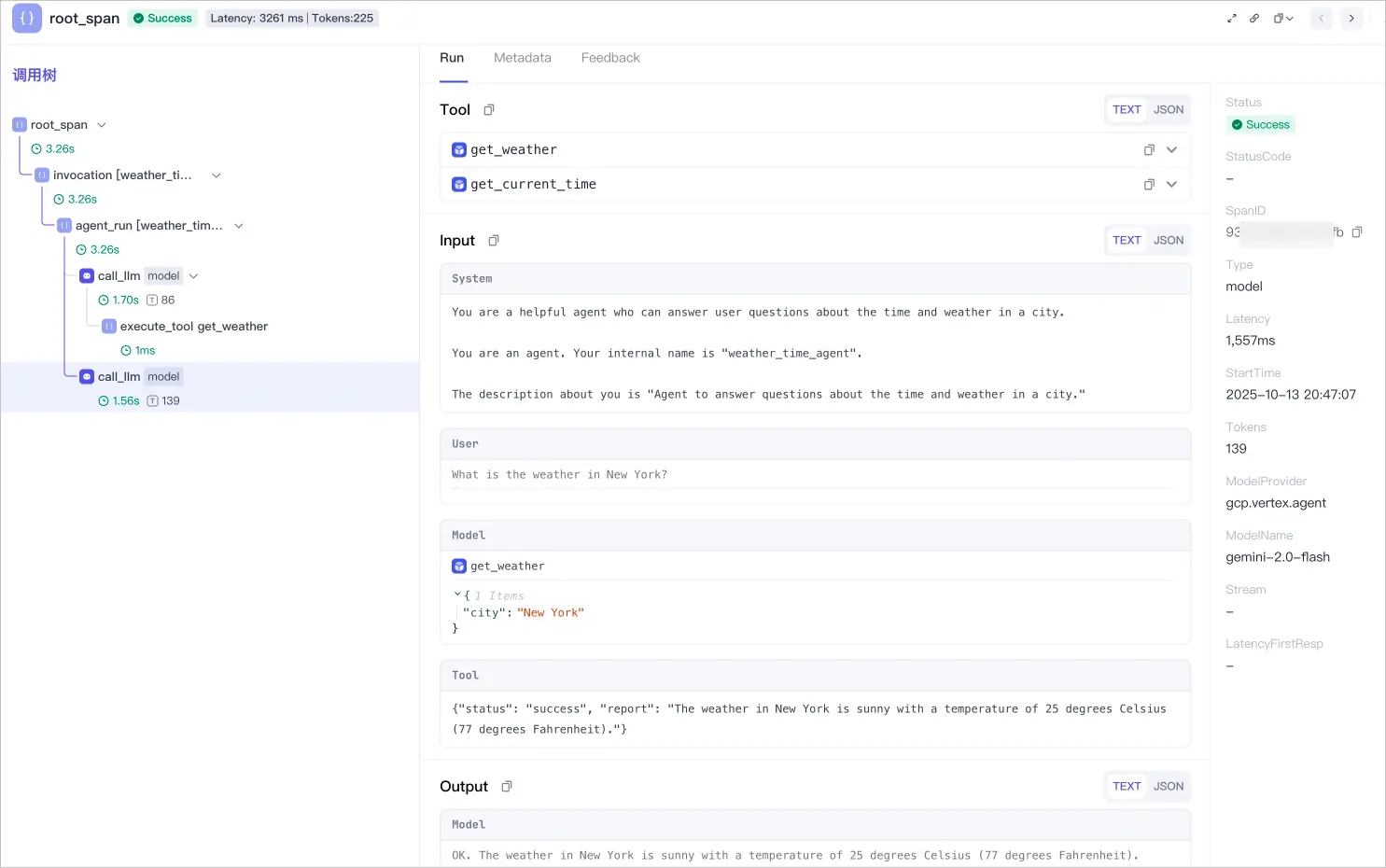
关于上报 Google ADK Trace 数据的更多示例,请参考 Google ADK。