升级企业版后更新 API 授权
复制页面
从个人版升级至企业版后,往往需要将已创建的工作空间迁移到新的企业中,以便原有的智能体和扣子应用使用企业的高级权益。如果你待迁移的智能体、扣子应用或工作流已发布到 API 渠道,直接迁移工作空间会导致原有的 API 授权失效,线上用户调用 API 时会因鉴权失败而无法正常访问。
在这种场景下,企业的超级管理员需要在迁移工作空间之前,先修改业务代码中的鉴权部分,添加新老授权的兼容逻辑,保障平滑迁移,过程线上无感知。
说明
从企业标准版升级至企业旗舰版时,无需迁移工作空间。
|
注意事项 |
说明 |
|---|---|
|
操作时段 |
如果智能体、应用或工作流已发布到生产环境、线上用户量较大,为了保障平滑迁移,建议选择服务流量较少的时段执行本步骤,例如深夜或凌晨时段。 |
|
权限设置 |
|
|
API 方式创建会话 |
由于智能体等资源属于空间,API 方式创建的会话属于扣子用户,迁移空间之后,智能体无权限访问原个人账号下的会话,建议开发者创建新会话。创建方式可参考创建会话。 |
|
原 OAuth 应用 |
请勿禁用或删除参考本文档完成改造的个人版 OAuth 应用,否则会影响在企业中的 OpenAPI 访问。 |
扣子提供了个人访问令牌、OBO 等多种授权类型,各种授权类型下,更新 API 授权的方式不同。你需要先确定自己的授权方式。
不同的扣子 OAuth 授权对应的授权类型和适用的客户端类型如下表所示。
|
授权类型 |
授权方式 |
客户端类型 |
|---|---|---|
|
个人访问令牌 |
无 |
|
|
OBO 授权 |
Web 后端应用 |
|
|
移动端/PC 桌面端/单页面应用 |
||
|
TV 端/设备应用/类命令行程序 |
||
|
AppAuth 授权 |
服务类应用 |
AppAuth 授权是指应用以自身身份去访问扣子编程的资源。例如,一个后端服务需要从扣子编程获取数据。
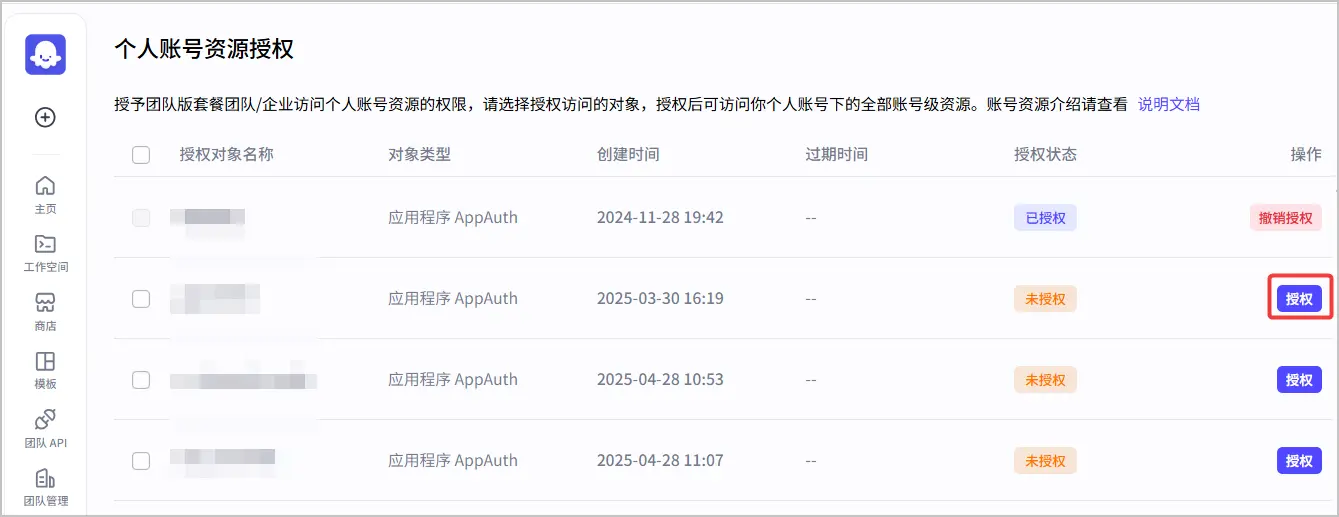
企业的超级管理员或管理员在企业版下完成对待迁移的 OAuth 应用的授权。
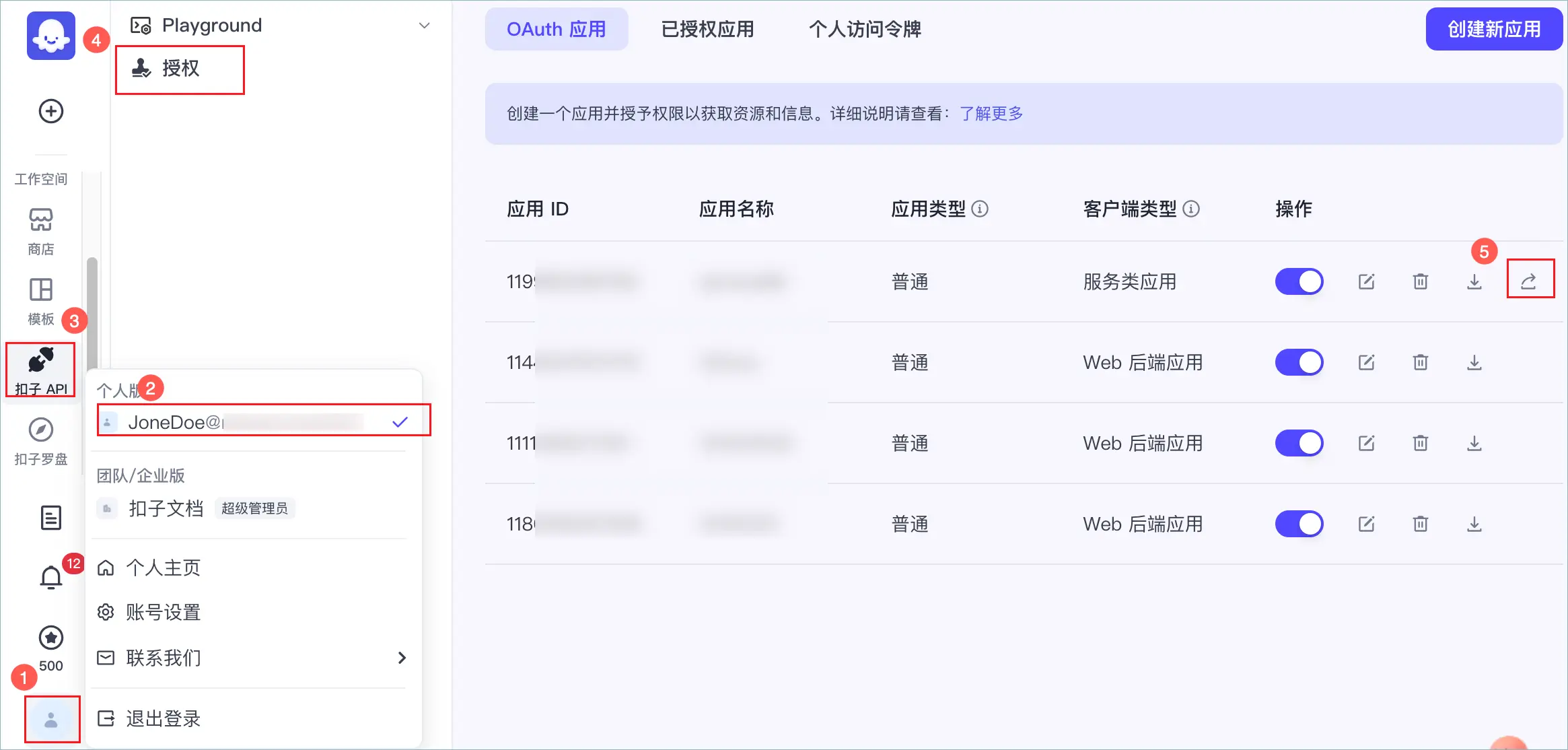
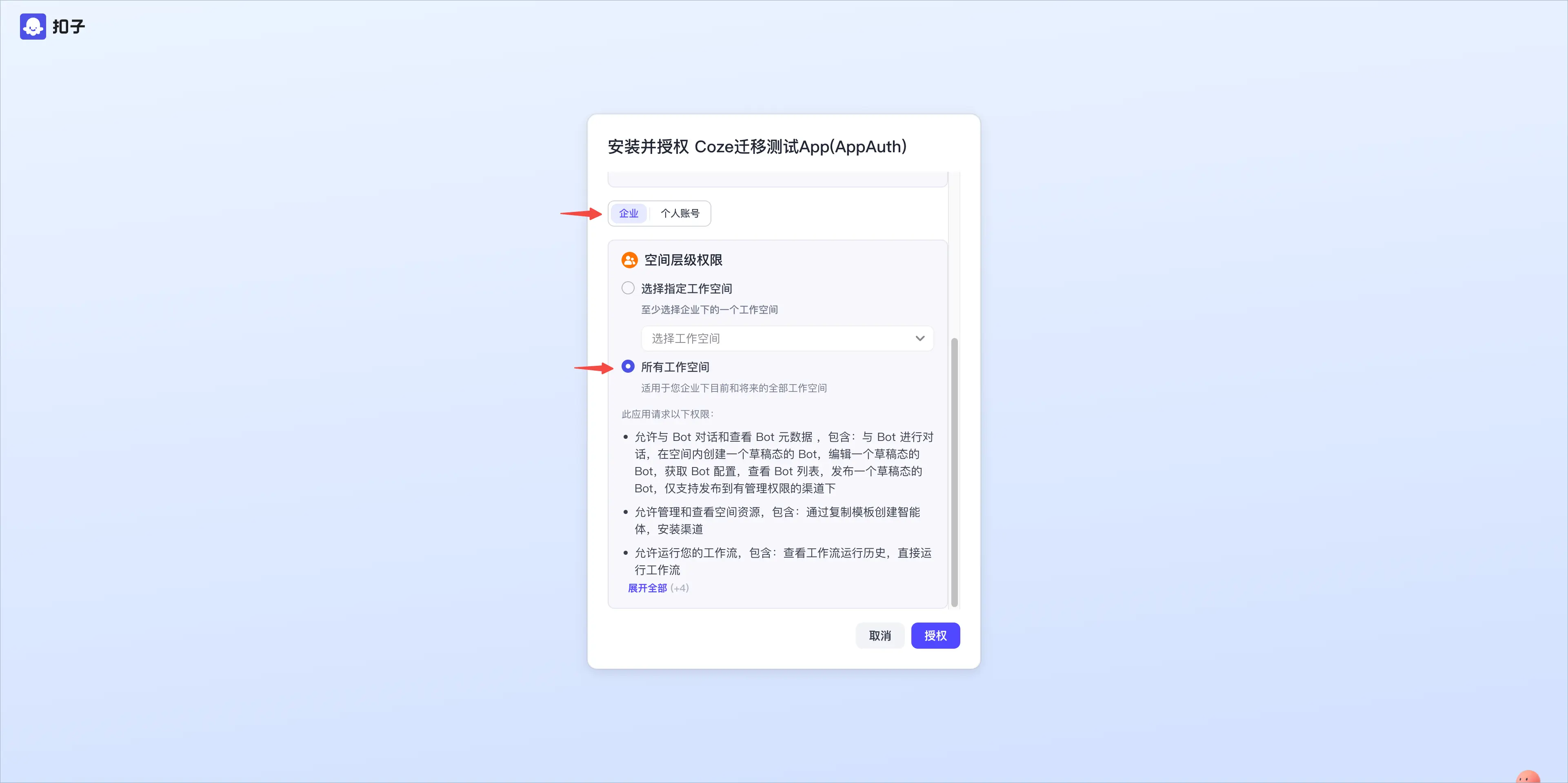
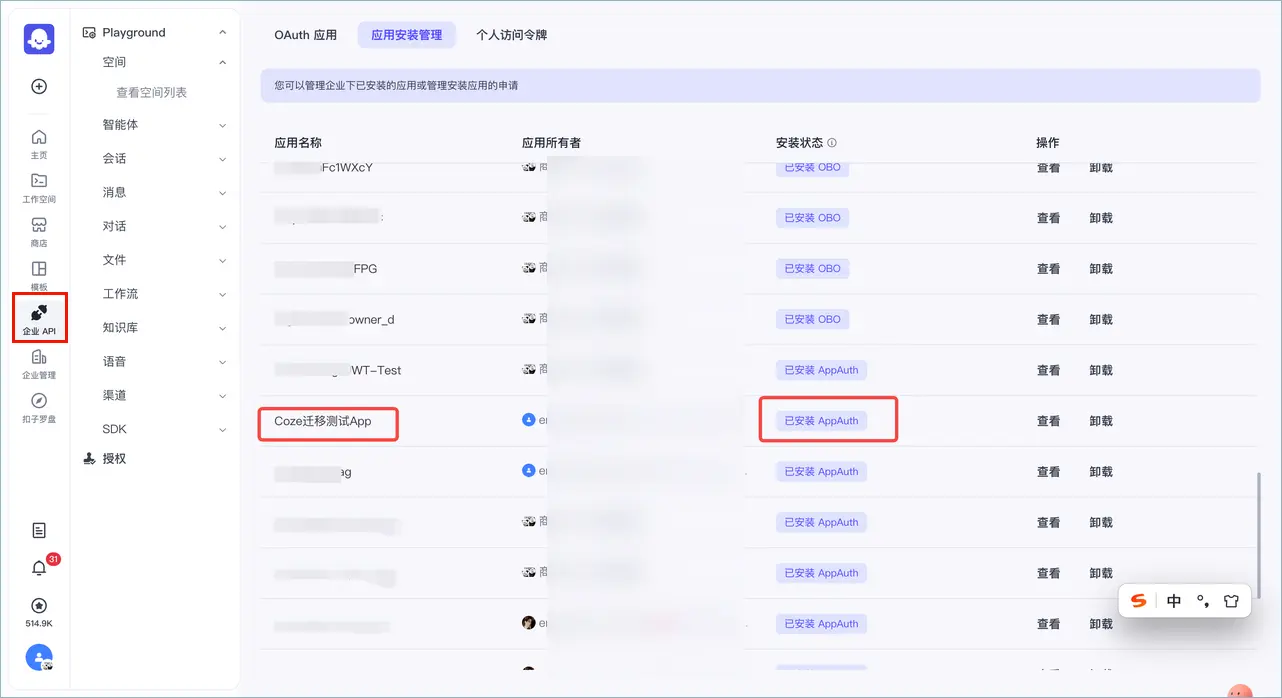
应用程序在请求 OpenAPI 时,需要同时获取个人版和企业版下的授权凭证,默认先基于个人版的凭证访问资源,如果返回请求无权限(4100 和 4101) 或资源不存在的错误码,则再次基于企业版的凭证访问资源。
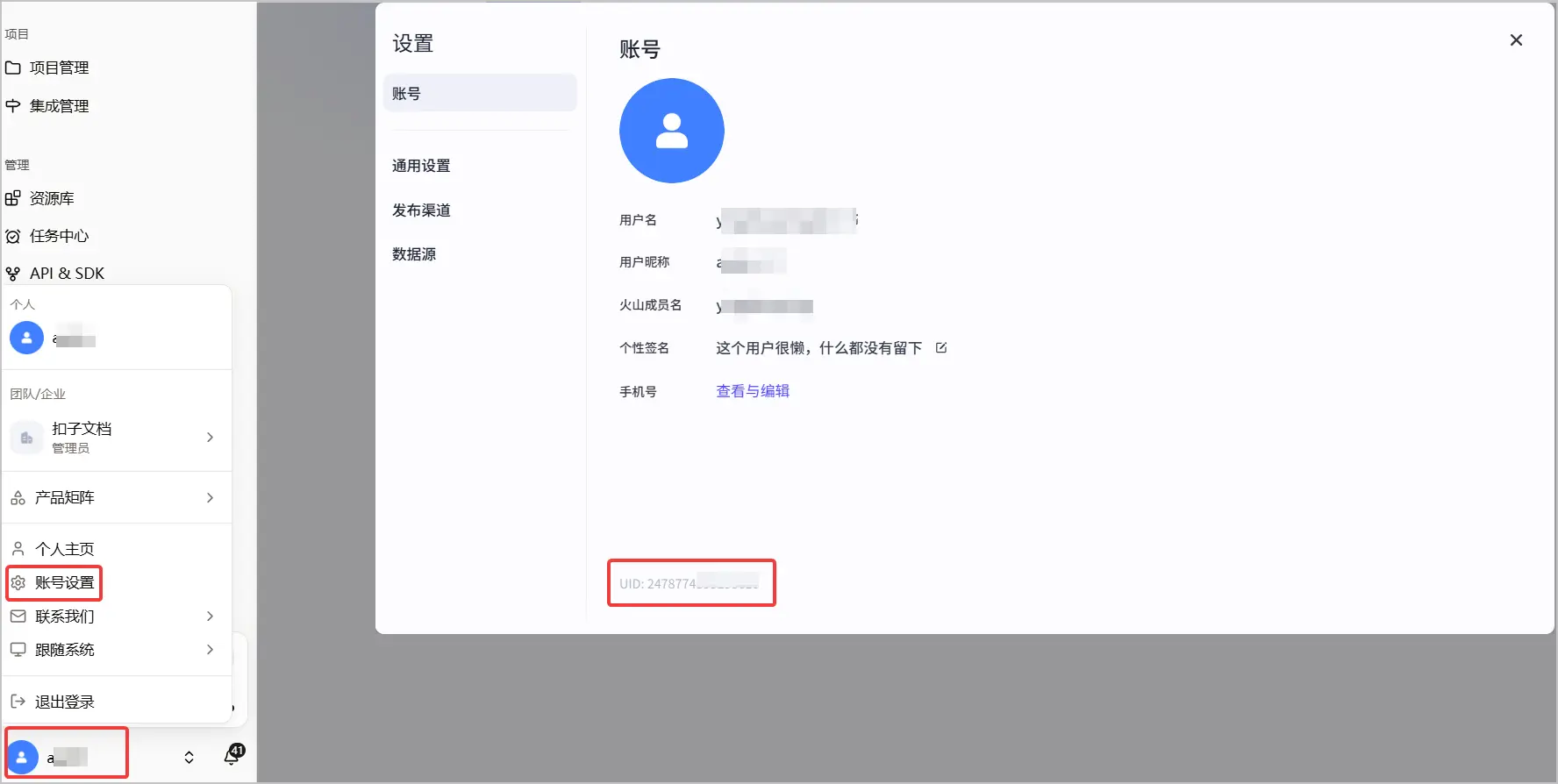
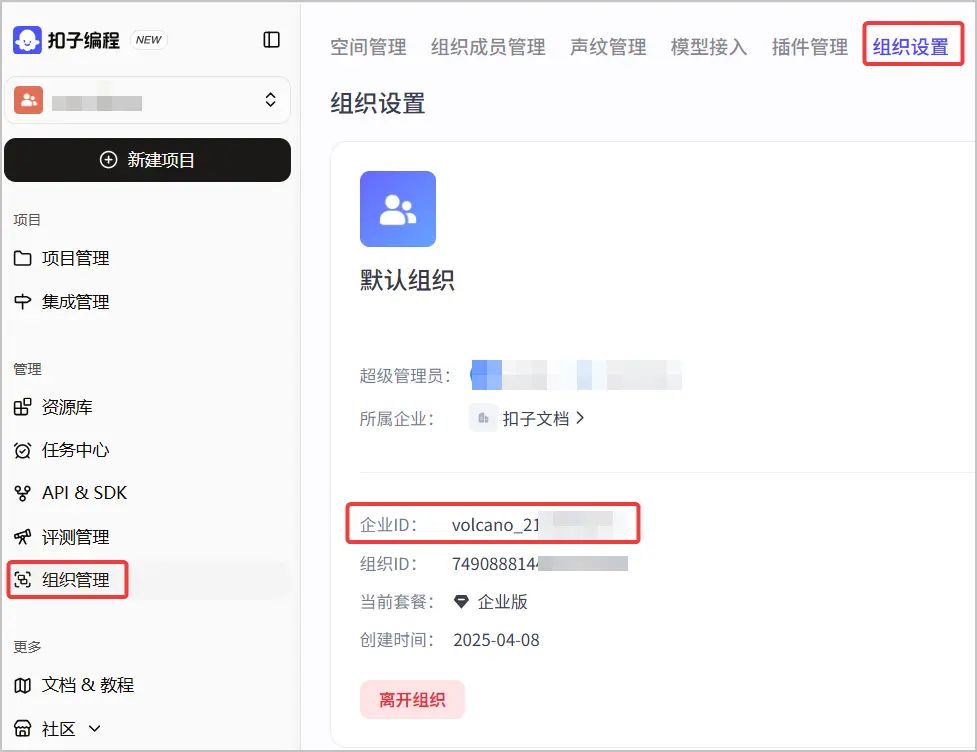
获取授权代码中需要填写的个人账号 UID 和企业 ID。
|
账号 |
获取方式 |
示例 |
|---|---|---|
|
个人账号 UID |
必须是创建 OAuth 应用的扣子账号 UID。 |
|
|
企业 ID |
你可以在组织管理 > 组织设置页面查看企业 ID。 |
|
更新授权代码。
以聊天接口为例,Go 语言代码改造方式如下,注意其中高亮部分:
package main

import (
   "context"
   "errors"
   "fmt"
   "github.com/coze-dev/coze-go"
   "os"
)

func main() {
   // The default access is api.coze.com, but if you need to access api.coze.cn,
   // please use base_url to configure the api endpoint to access
   cozeAPIBase := os.Getenv("COZE_API_BASE")
   jwtOauthClientID := os.Getenv("COZE_JWT_OAUTH_CLIENT_ID")
   jwtOauthPrivateKey := os.Getenv("COZE_JWT_OAUTH_PRIVATE_KEY")
   jwtOauthPrivateKeyFilePath := os.Getenv("COZE_JWT_OAUTH_PRIVATE_KEY_FILE_PATH")
   jwtOauthPublicKeyID := os.Getenv("COZE_JWT_OAUTH_PUBLIC_KEY_ID")
   botID := os.Getenv("PUBLISHED_BOT_ID")
   uid := os.Getenv("USER_ID")

   // Read private key from file
   privateKeyBytes, err := os.ReadFile(jwtOauthPrivateKeyFilePath)
   if err != nil {
      fmt.Printf("Error reading private key file: %v\n", err)
      return
   }
   jwtOauthPrivateKey = string(privateKeyBytes)

   oauth, err := coze.NewJWTOAuthClient(coze.NewJWTOAuthClientParam{
      ClientID: jwtOauthClientID, PublicKey: jwtOauthPublicKeyID, PrivateKeyPEM: jwtOauthPrivateKey,
   }, coze.WithAuthBaseURL(cozeAPIBase))
   if err != nil {
      fmt.Printf("Error creating JWT OAuth client: %v\n", err)
      return
   }
   ctx := context.Background()

   var personalAccountId int64 = 12345   // 个人版 账号 UID
   var enterpriseAccountId int64 = 23456 // 企业版 账号 ID

   // 获取个人版下的访问凭证
   cozeCli := coze.NewCozeAPI(coze.NewJWTAuth(oauth, &coze.GetJWTAccessTokenReq{
      AccountID:   &personalAccountId,
   }), coze.WithBaseURL(cozeAPIBase))
   // 获取企业版下的访问凭证
   cozeCli4Enterprise := coze.NewCozeAPI(coze.NewJWTAuth(oauth, &coze.GetJWTAccessTokenReq{
      EnterpriseID:   &enterpriseAccountId,
   }), coze.WithBaseURL(cozeAPIBase))

   req := &coze.CreateChatsReq{
      BotID:  botID,
      UserID: uid,
      Messages: []*coze.Message{
         coze.BuildUserQuestionText("What can you do?", nil),
      },
   }

   // 先尝试通过个人版的凭证请求chat接口
   resp, err := cozeCli.Chat.Create(ctx, req)
   if err == nil {
      fmt.Println(resp)
      return
   }
   // 当请求个人版接口出现鉴权失败时, 再尝试基于企业版的凭证请求chat接口
   cozeErr := coze.Error{}
   if errors.As(err, &cozeErr) {
      // no permission error code
      if cozeErr.Code == 4101 || cozeErr.Code == 4100 {
         // no permission try chat with enterprise account
         resp, err = cozeCli4Enterprise.Chat.Create(ctx, req)
         if err == nil {
            fmt.Println(resp)
            return
         }
      }
   }
   fmt.Println(err)
}
验证授权逻辑。
修改授权相关代码之后,建议确认代码中增加的逻辑准确、有效。例如在企业中新建空间和智能体,使用更新后的授权代码访问新智能体,对齐接口能力,验证通过之后再迁移工作空间。
操作步骤可参考功能简介。成功迁移之后,后端服务如果使用旧的凭证请求扣子 OpenAPI,鉴权失败之后会自动切换为新的凭证,保证线上访问无影响。
如果你通过个人访问令牌来请求扣子 OpenAPI,那么可以创建新的个人访问令牌,并在代码中添加兼容逻辑。即在授权代码中同时添加旧的个人访问令牌和新的个人访问令牌,如果调用扣子 Open API 鉴权失败,则使用扣子企业版的个人访问令牌。
详细操作步骤如下:
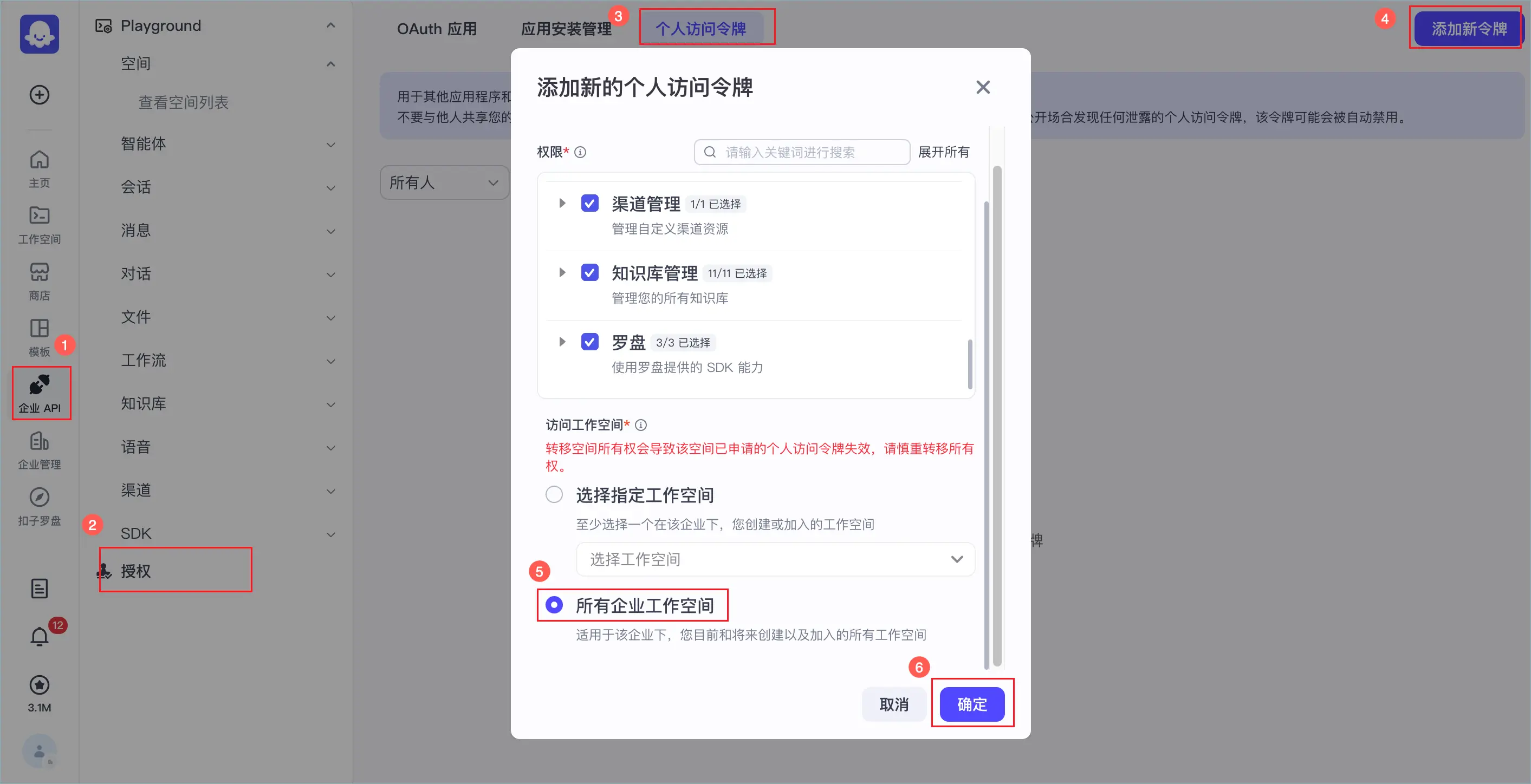
在授权代码中添加旧的个人访问令牌和新的个人访问令牌,如果使用旧令牌调用扣子 Open API 鉴权失败,则自动切换为企业空间的新令牌。
修改授权相关代码之后,建议确认代码中增加的逻辑准确、有效。例如在企业中新建空间和智能体,使用更新后的授权代码访问新智能体,对齐接口能力,验证通过之后再迁移工作空间。
Go **** 语言代码示例如下,其中高亮部分为新增内容。
package main

import (
   "context"
   "errors"
   "fmt"
   "os"

   "github.com/coze-dev/coze-go"
)

// How to use personal access token to init Coze client.
//
// Firstly, you need to access https://www.coze.com/open/oauth/pats (for the cn environment,
// visit https://www.coze.cn/open/oauth/pats).
//
// Click to add a new token. After setting the appropriate name, expiration time, and
// permissions, click OK to generate your personal access token. Please store it in a
// secure environment to prevent this personal access token from being disclosed.
func main() {
   cozeAPIToken := os.Getenv("COZE_API_TOKEN")
   cozeAPIToken4Enterprise := os.Getenv("COZE_API_TOKEN_ENTERPRISE")

   //
   // The default access is api.coze.com, but if you need to access api.coze.cn,
   // please use base_url to configure the api endpoint to access
   //
   cozeAPIBase := os.Getenv("COZE_API_BASE")

   ctx := context.Background()
   //
   // The Coze SDK offers the TokenAuth class for constructing an Auth class based on a fixed
   // access token. Meanwhile, the Coze class enables the passing in of an Auth class to build
   // a coze client.
   //
   // Therefore, you can utilize the following code to initialize a coze client.
   //

   cozeCli := coze.NewCozeAPI(coze.NewTokenAuth(cozeAPIToken), coze.WithBaseURL(cozeAPIBase))
   cozeCli4Enterprise := coze.NewCozeAPI(coze.NewTokenAuth(cozeAPIToken4Enterprise), coze.WithBaseURL(cozeAPIBase))

   // Try chat with the bot under your personal account
   resp, err := cozeCli.Chat.Create(ctx, &coze.CreateChatsReq{
      // your chat request params
   })
   if err == nil {
      fmt.Println(resp)
      return
   }
   // Retry chat with the bot under your enterprise account
   cozeErr := coze.Error{}
   if errors.As(err, &cozeErr) {
      // Authentication or Authorization Deny
      if cozeErr.Code == 4100 || cozeErr.Code == 4101 {
         resp, err = cozeCli4Enterprise.Chat.Create(ctx, &coze.CreateChatsReq{
            // your chat request params
         })
         if err == nil {
            fmt.Println(resp)
            return
         }
      }
   }
   fmt.Println(err)
}
操作步骤可参考功能简介。成功迁移之后,后端服务如果使用旧的个人访问密钥请求扣子 OpenAPI,鉴权失败之后会自动切换为新的密钥,保证线上访问无影响。
说明
OBO (On Behalf Of)授权是指应用以用户的身份去访问扣子编程的资源。例如,在 Web 后端应用、TV 端/设备应用/类命令行程序、移动端/PC 桌面端/单页面应用中,应用获取授权后,以用户的身份调用扣子编程的 API。
在 OBO 授权场景中,开发者需要添加授权失败场景的处理策略,即鉴权失败时重新触发授权,获取新的 Access Token。
修改业务代码,设置后端服务在鉴权失败时重新触发授权,获取新的 Access Token。
修改授权相关代码之后,建议确认代码中增加的逻辑准确、有效。例如在企业中新建空间和智能体,使用更新后的授权代码访问新智能体,对齐接口能力,验证通过之后再迁移工作空间。
本文以 Go **** 语言 OAuth 授权码授权场景为例,具体实现请参考以下示例代码中高亮的部分。
package main

import (
   "context"
   "errors"
   "fmt"
   "net/http"
   "os"

   "github.com/coze-dev/coze-go"
)

// How to effectuate OpenAPI authorization through the OAuth authorization code method.
//
// Firstly, users need to access https://www.coze.com/open/oauth/apps. For the cn environment,
// users need to access https://www.coze.cn/open/oauth/apps to create an OAuth App of the type
// of Web application.
// The specific creation process can be referred to in the document:
// https://www.coze.com/docs/developer_guides/oauth_code. For the cn environment, it can be
// accessed at https://www.coze.cn/docs/developer_guides/oauth_code.
// After the creation is completed, the client ID, client secret, and redirect link, can be
// obtained. For the client secret, users need to keep it securely to avoid leakage.

func main() {
   redirectURI := os.Getenv("COZE_WEB_OAUTH_REDIRECT_URI")
   clientSecret := os.Getenv("COZE_WEB_OAUTH_CLIENT_SECRET")
   clientID := os.Getenv("COZE_WEB_OAUTH_CLIENT_ID")
   ctx := context.Background()

   // The default access is api.coze.com, but if you need to access api.coze.cn,
   // please use base_url to configure the api endpoint to access
   cozeAPIBase := os.Getenv("COZE_API_BASE")
   if cozeAPIBase == "" {
      cozeAPIBase = coze.ComBaseURL
   }

   // The sdk offers the WebOAuthClient class to establish an authorization for Web OAuth.
   // Firstly, it is required to initialize the WebOAuthApp with the client ID and client secret.
   oauth, err := coze.NewWebOAuthClient(clientID, clientSecret, coze.WithAuthBaseURL(cozeAPIBase))
   if err != nil {
      fmt.Printf("Failed to create OAuth client: %v\n", err)
      return
   }

   // Generate the authorization link and direct the user to open it.
   oauthURL := oauth.GetOAuthURL(ctx, &coze.GetWebOAuthURLReq{
      RedirectURI: redirectURI,
      State:       "state",
   })
   fmt.Println(oauthURL)

   // The space permissions for which the Access Token is granted can be specified. As following codes:
   // oauthURL = oauth.GetOAuthURL(&coze.GetWebOAuthURLReq{
   //     RedirectURI: redirectURI,
   //     State:       "state",
   //     WorkspaceID: &workspaceID,
   // })
   // fmt.Println(oauthURL)

   // After the user clicks the authorization consent button, the coze web page will redirect
   // to the redirect address configured in the authorization link and carry the authorization
   // code and state parameters in the address via the query string.
   //
   // Get from the query of the redirect interface: query.get('code')
   code := "mock code"

   // After obtaining the code after redirection, the interface to exchange the code for a
   // token can be invoked to generate the coze access_token of the authorized user.
   resp, err := oauth.GetAccessToken(ctx, &coze.GetWebOAuthAccessTokenReq{
      Code:        code,
      RedirectURI: redirectURI,
   })
   if err != nil {
      fmt.Printf("Failed to get access token: %v\n", err)
      return
   }
   fmt.Println(resp)

   // When the token expires, you can also refresh and re-obtain the token
   resp, err = oauth.RefreshToken(ctx, resp.RefreshToken)
   if err != nil {
      fmt.Printf("Failed to refresh token: %v\n", err)
      return
   }

   fmt.Printf("%+v\n", resp)

   // you can get request log by getLogID method
   fmt.Println(resp.LogID())

   // use the access token to init Coze client
   cozeCli := coze.NewCozeAPI(coze.NewTokenAuth(resp.AccessToken))
   _, err = cozeCli.Chat.Create(ctx, &coze.CreateChatsReq{
      // chat request params
   })
   if err != nil {
      cozeErr := coze.Error{}
      if errors.As(err, &cozeErr) {
         // no permission error code
         if cozeErr.Code == 4101 || cozeErr.Code == 4100 {
            // request user authorization agin
            // redirect to oauthURL
            // call http.Redirect(w, r, oauthURL, http.StatusFound)
         }
      }
   }
   _ = cozeCli
}
操作步骤可参考功能简介。
企业的超级管理员或管理员登录应用触发授权,然后在扣子编程重新安装应用,安装的步骤请参见OAuth 应用管理。
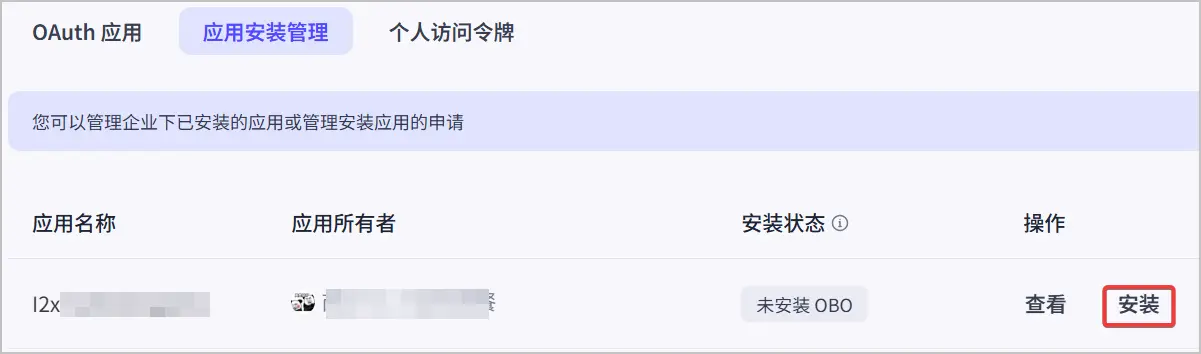
成功迁移工作空间之后,应实时监测线上服务的请求成功率,确保线上服务无异常。
如果线上授权相关逻辑持续稳定运行,可以酌情考虑线下原授权代码,切换为新的授权凭证来访问扣子 OpenAPI。
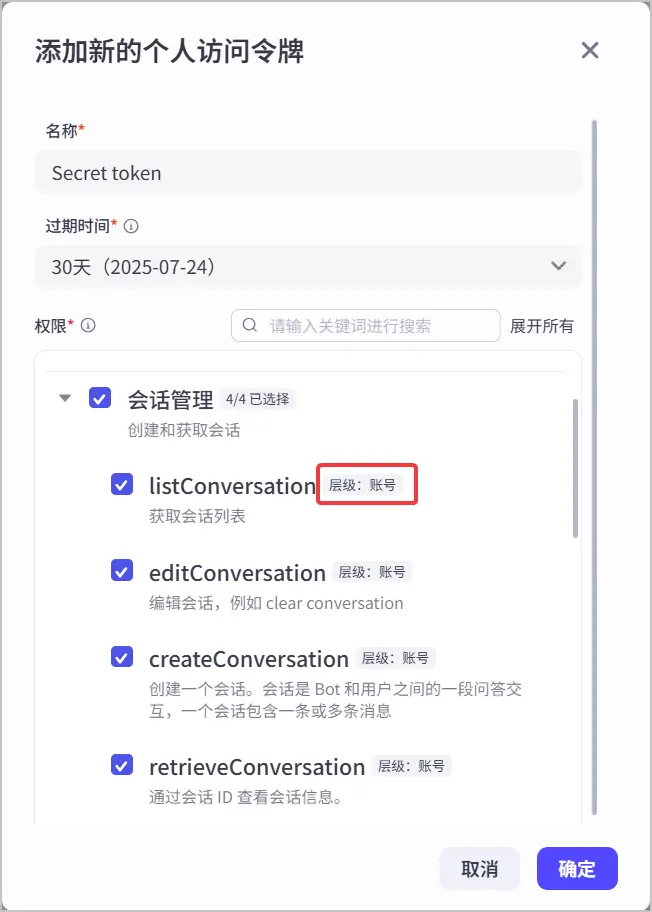
购买扣子企业并完成个人工作空间迁移后,因会话、音色等账号级别的资源无法自动迁移,若希望让企业下的访问令牌也能访问原个人空间中的账号级别的资源,超级管理员或管理员可以手动授权企业版中的 Token 访问个人账号中的会话、音色等账号级资源。
说明