
快速开始
复制页面
本文指导你如何安装并使用扣子罗盘 Node.js SDK 进行数据上报。
扣子罗盘 Node SDK @cozeloop/ai 适用于 Node.js 18 及以上版本。安装之前,可执行以下命令确认你的 Node.js 版本。
推荐使用 fnm 管理 Node.js 版本。
# 查看 Node 版本
node -v
在使用扣子罗盘 Node SDK 前,确保你已经完成了授权。详情请参考SDK 鉴权。
执行以下命令安装扣子罗盘 Node.js SDK。
npm install @cozeloop/ai
# or
pnpm install @cozeloop/ai
默认直接安装最新版本的 SDK。如果你想使用历史版本,单击此处查看历史版本记录和 README。
初始化扣子罗盘 ApiClient 之后,才可以访问 SDK 提供的 API。
初始化时推荐通过环境变量动态获取访问密钥,以免硬编码引发数据安全风险。 设置完成环境变量后,你可以直接访问 SDK API 实现相应功能。
以下示例代码展示了如何使用扣子罗盘 ApiClient,并请求某个 API。
const apiClient = new ApiClient({
  /**
   * Api baseURL, default value is:
   * * process.env.COZELOOP_API_BASE_URL
   * * https://api.coze.cn
   */
  baseURL: 'https://api.coze.cn',
  /**
   * Personal Access Token (PAT) or OAuth2.0 token, or a function to get token.
   * use process.env.COZELOOP_API_TOKEN when unprovided
   */
  token: '',
  /** Custom axios instance */
  axiosInstance: axios,
  /**
   * Partial [axios request-config](https://github.com/axios/axios?tab=readme-ov-file#request-config), excludes url, method, baeURL, data and responseType.
   */
  axiosOptions: {},
  /** Custom headers */
  headers: {},
});

const resp = await apiClient.post('/v1/api_url', {/** data */});
扣子罗盘 SDK 的主要能力组件如 Tracer、PromptHub 等都依赖 ApiClient实例或 ApiClient 配置参数。
示例代码:https://github.com/coze-dev/cozeloop-js/tree/main/examples/cozeloop-ai-node/src
完整示例:https://github.com/coze-dev/cozeloop-js/blob/main/examples/cozeloop-ai-node/src/tracer/index.ts
参考以下代码初始化全局 Tracer 实例。(请尽早,比如在应用启动时。)
// initialize tracer globally
cozeLoopTracer.initialize({
  /** workspace id, use process.env.COZELOOP_WORKSPACE_ID when unprovided */
  workspaceId: 'your_workspace_id',
  apiClient: {
    baseURL: 'https://api.coze.cn',
    token: 'your_api_token',
  },
  /** Allow ultra long text report */
  ultraLargeReport: true,
});
完整示例:https://github.com/coze-dev/cozeloop-js/blob/main/examples/cozeloop-ai-node/src/tracer/root.ts
建议将一次完整的用户请求串联成一个 Trace。在服务入口处,上报一个 Root Span,并在此注入相关的业务 ID 便于 Trace 定位和统计分析。
import { cozeLoopTracer } from '@cozeloop/ai';

export async function runRoot() {
  // We recommend concatenating a complete user request into a trace,
  // so the recommended approach is to report a root span at the entrance of the entire execution
  await cozeLoopTracer.traceable(
    async () => {
      // execute your method
      const result = await doSomething();

      return result;
    },
    {
      name: 'TestRootSpan',
      type: 'RootSpanType',
      // you can set your own baggage fields (eg. userId),
      // these fields will be automatically passed through and set in all sub-spans
      baggages: {
        user_id: 'uid-123',
        message_id: 'msg-123',
        thread_id: 'thread-123',
        custom_id: 'custom-123',
      },
    },
  );
}
完整示例:https://github.com/coze-dev/cozeloop-js/blob/main/examples/cozeloop-ai-node/src/tracer/basic.ts
扣子罗盘支持在任何关键节点进行自定义 span 上报,并自由设置关键信息和自定义 tag。每个traceable所包装的span实例将透传给内部业务方法,使用者可以在方法中消费。
import { cozeLoopTracer } from '@cozeloop/ai';

export async function runCustom() {
  // Wrap any function to make it traceable
  await cozeLoopTracer.traceable(
    async parentSpan => {
      // Manually set input
      cozeLoopTracer.setInput(parentSpan, 'xxx');

      // Invoke any function, if it throws error, error will be caught and automatically set span as error
      const result = await doSomething();

      // Or, you can manually set error
      cozeLoopTracer.setError(parentSpan, 'custom error message');

      // You can also trace nested span, the parent-child relationship of span will be automatically concatenated
      await cozeLoopTracer.traceable(
        async childSpan => {
          // Set custom tags
          childSpan.setAttribute('custom-tag', 'xxx');

          await doSomething();
        },
        {
          name: 'TestCustomChildSpan',
          type: 'MyCustomType',
        },
      );

      // Automatically set return value as output
      return result;
    },
    {
      name: 'TestCustomParentSpan',
      type: 'MyCustomType',
    },
  );
}
完整示例:https://github.com/coze-dev/cozeloop-js/blob/main/examples/cozeloop-ai-node/src/tracer/llm.ts
模型调用往往是最关键的节点,可将 span type 设置为 SpanKind.Model,并上报 Model的相关信息,在上报 input 和 output 时建议使用和遵循 SDK 提供的 LoopTraceLLMCallInput 和 LoopTraceLLMCallOutput 类型,以便在平台获得更好的观测体验。
import { SpanKind } from '@cozeloop/ai';
import {
  COZELOOP_TRACE_BUSINESS_TAGS,
  cozeLoopTracer,
  type LoopTraceLLMCallInput,
} from '@cozeloop/ai';

export async function runModel() {
  // Wrap model invoke function to make it traceable
  await cozeLoopTracer.traceable(
    async span => {
      const input: LoopTraceLLMCallInput = {
        messages: [
          {
            role: 'user',
            content: 'hi',
          },
        ],
        tools: [
          {
            type: 'function',
            function: {
              name: 'test-tool',
              description: 'tool-description',
              parameters: {
                type: 'object',
                properties: {
                  name: { type: 'string' },
                },
              },
            },
          },
        ],
        tool_choice: {
          type: 'auto',
          function: {
            name: 'test-tool',
          },
        },
      };

      // Manually set input, if the input satisfies the LoopTraceLLMCallInput structure,
      // the results will be better displayed in the CozeLoop platform
      cozeLoopTracer.setInput(span, input);

      // Invoke/stream model
      const result = await fakeLLMCall();

      // Set model related tags
      cozeLoopTracer.setTags(span, {
        [COZELOOP_TRACE_BUSINESS_TAGS.MODEL_NAME]: 'custom-model',
        [COZELOOP_TRACE_BUSINESS_TAGS.MODEL_PROVIDER]: 'cozeloop',
        [COZELOOP_TRACE_BUSINESS_TAGS.CALL_OPTIONS]: {
          temperature: 0.5,
          max_tokens: 1000,
        },
        [COZELOOP_TRACE_BUSINESS_TAGS.INPUT_TOKENS]: 100,
        [COZELOOP_TRACE_BUSINESS_TAGS.OUTPUT_TOKENS]: 200,
        [COZELOOP_TRACE_BUSINESS_TAGS.TOKENS]: 300,
        // If you use streaming return, record the microsecond timestamp returned by the first Token,
        // and the SDK will automatically calculate the time spent on the first Token
        [COZELOOP_TRACE_BUSINESS_TAGS.START_TIME_FIRST_RESP]: 1741305600123456,
      });

      // Manually set output, if the output satisfies the LoopTraceLLMCallOutput structure,
      // the results will be better displayed in the CozeLoop platform
      cozeLoopTracer.setOutput(span, result);

      return result.choices;
    },
    {
      name: 'TestModelSpan',
      type: SpanKind.Model,
    },
  );
}
完整示例:https://github.com/coze-dev/cozeloop-js/blob/main/examples/cozeloop-ai-node/src/tracer/large-text.ts
在 Tracer 初始化时,如果将 ultraLargeReport 设置为 true,则启用超大文本上报。当 Input / Output 内容超过 1 MB 时,将通过文件形式进行上报,并可在平台上查看完整内容;如果未启用该选项,超出大小限制的内容将会被丢弃。
import {
  cozeLoopTracer,
  SpanKind,
  type LoopTraceLLMCallInput,
} from '@cozeloop/ai';

function generateLargeString(sizeInMB: number) {
  const repeats = sizeInMB * 1024 * 1024;
  return 'x'.repeat(repeats);
}

// You can enable the reporting of ultra-long texts by setting
// ultraLargeReport to true when you initialize tracer
export async function runLargeText() {
  await cozeLoopTracer.traceable(
    async span => {
      // Reporting of ultra-long texts will only take effect when the
      // input / output satisfies the LoopTraceLLMCallInput / LoopTraceLLMCallOutput structure
      const input: LoopTraceLLMCallInput = {
        messages: [
          {
            role: 'user',
            content: generateLargeString(2),
          },
        ],
      };

      // Manually set input
      cozeLoopTracer.setInput(span, input);

      // execute your method
      const result = await doSomething();

      return result;
    },
    {
      name: 'TestLargeTextSpan',
      type: SpanKind.Model,
    },
  );
}
Model Span 的 Input / Output 可能包含图片或文件。当 Input / Output 遵循 SDK 提供的 LoopTraceLLMCallInput 和 LoopTraceLLMCallOutput 类型时,多模态资源将被自动处理和上报。图片和文件应使用标准的 MDN 格式或公网可访问的 URL
import {
  cozeLoopTracer,
  SpanKind,
  type LoopTraceLLMCallInput,
} from '@cozeloop/ai';

export async function runMultiModality() {
  await cozeLoopTracer.traceable(
    async span => {
      // Reporting of multi modality will only take effect when the
      // input / output satisfies the LoopTraceLLMCallInput / LoopTraceLLMCallOutput structure
      const input: LoopTraceLLMCallInput = {
        messages: [
          {
            role: 'user',
            content: '',
            parts: [
              // current support base64 encoded image and file
              {
                type: 'image_url',
                image_url: {
                  url: 'data:image/png;base64,XXX',
                },
              },
              {
                type: 'file_url',
                file_url: {
                  name: 'test.txt',
                  url: 'data:text/plain;base64,XXX',
                },
              },
            ],
          },
        ],
      };

      // Manually set input
      cozeLoopTracer.setInput(span, input);

      // execute your method
      const result = await doSomething();

      return result;
    },
    {
      name: 'TestMultiModalitySpan',
      type: SpanKind.Model,
    },
  );
}
injectWithCozeLoopHeaders来将上下文信息注入headers:import { context, injectWithCozeLoopHeaders } from '@cozeloop/ai';
const headers: Record<string, string> = {};
injectWithCozeLoopHeaders(context.active(), headers);
propagation.inject来将上下文信息注入headers:import { propagation } from '@opentelemetry/api';
import { context } from '@cozeloop/ai';
const headers: Record<string, string> = {};
propagation.inject(context.active(), headers);
extractWithCozeLoopHeaders并传入带有 CozeLoop SDK 协议的 headers 来得到 Context:import { context, extractWithCozeLoopHeaders, cozeLoopTracer } from '@cozeloop/ai';
const extractedContext = extractWithCozeLoopHeaders(
context.active(),
headers,
);
context.with(extractedContext, () =>
cozeLoopTracer.traceable(
() => {
doSomething();
},
{
name: 'XXX',
type: 'XXX',
},
),
);
propagation.extract并传入带有标准W3C协议的 headers 来得到 Context:import { propagation } from '@opentelemetry/api';
import { context, extractWithCozeLoopHeaders, cozeLoopTracer } from '@cozeloop/ai';
const extractedContext = propagation.extract(context.active(), headers);
context.with(extractedContext, () =>
cozeLoopTracer.traceable(
() => {
doSomething();
},
{
name: 'XXX',
type: 'XXX',
},
),
);
完整示例如下:
import { setupServer } from 'msw/node';
import { http, HttpResponse } from 'msw';
import axios, { type AxiosRequestConfig } from 'axios';
import { ROOT_CONTEXT } from '@opentelemetry/api';
import {
  cozeLoopTracer,
  injectWithCozeLoopHeaders,
  context,
  extractWithCozeLoopHeaders,
} from '@cozeloop/ai';

import { doSomething } from './utils';

function setupMockServer() {
  const mockServer = setupServer(
    http.post(/\/mock\/service\/api\/endpoint/, async req => {
      // Simulate collecting headers in the request
      const headers: Record<string, string> = {};
      req.request.headers.forEach((value, key) => {
        headers[key] = value;
      });

      // Simulate a new context environment (for example, in a cross-service scenario) by
      // setting context to ROOT_CONTEXT, you don't need to take this step in real cross-service calls
      return await context.with(
        ROOT_CONTEXT,
        // Simulate service execution
        async () => await mockService({ headers }),
      );
    }),
  );

  return {
    start: () => mockServer.listen({ onUnhandledRequest: 'bypass' }),
    close: () => mockServer.close(),
  };
}

async function mockService(req: { headers: Record<string, string> }) {
  // Read the information of the current context from the headers

  const extractedContext = extractWithCozeLoopHeaders(
    context.active(),
    req.headers,
  );

  // Use the extracted context
  return await context.with(
    extractedContext,
    async () =>
      await cozeLoopTracer.traceable(
        async () => {
          const result = await doSomething();

          return HttpResponse.json({
            code: 0,
            msg: '',
            data: {
              result,
            },
          });
        },
        {
          name: 'ChildSpan',
          type: 'TransferBetweenServicesType',
        },
      ),
  );
}

export async function runTransferBetweenServices() {
  const mockServer = setupMockServer();
  mockServer.start();

  const result = await cozeLoopTracer.traceable(
    async span => {
      span.setAttribute('custom-tag', 'xxx');

      const headers: AxiosRequestConfig['headers'] = {};

      // Generate the information in the current context as headers
      injectWithCozeLoopHeaders(context.active(), headers);

      const resp = await axios.post(
        'http://mock/service/api/endpoint',
        {},
        {
          headers,
        },
      );
      return resp.data;
    },
    {
      name: 'ParentSpan',
      type: 'TransferBetweenServicesType',
      // The baggage fields will be automatically passed through
      baggages: {
        user_id: 'uid-123',
        message_id: 'msg-123',
        thread_id: 'thread-123',
      },
    },
  );

  mockServer.close();

  return result;
}
完整示例:https://github.com/coze-dev/cozeloop-js/blob/main/examples/cozeloop-ai-node/src/prompt/hub.ts
在使用 SDK 拉取 Prompt 前,需要在扣子罗盘的 Prompt 开发页面获取 Prompt Key 和版本号。
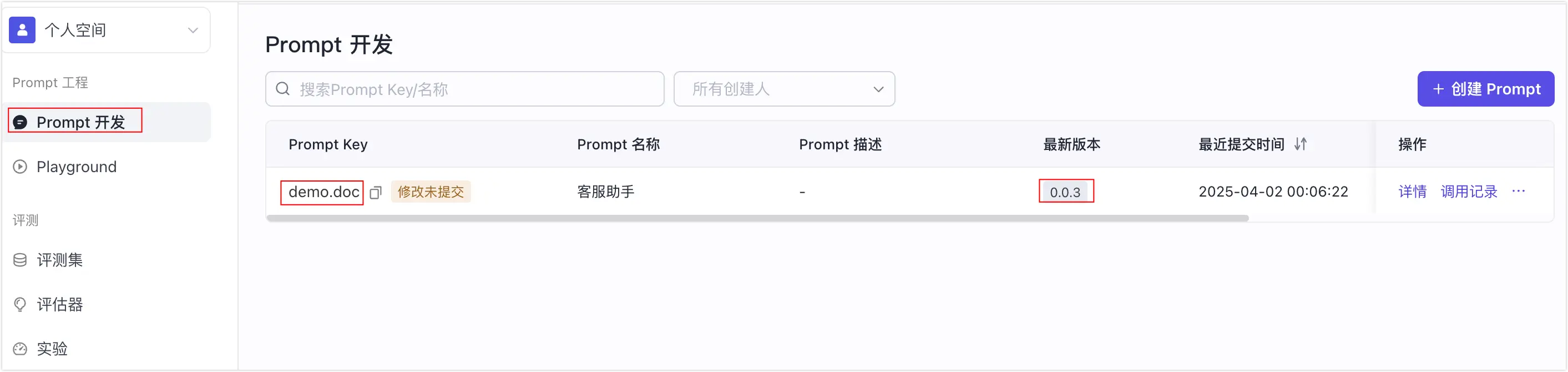
扣子罗盘 SDK 提供接口来拉取在扣子罗盘中创建并提交的 Prompt。通过 hub.get() 方法可以获取指定 Key 的 Prompt(支持指定版本或使用最新版本),然后使用 hub.formatPrompt() 方法完成变量替换。设置 traceable 为 true 后,SDK 会自动记录 Prompt 的获取和渲染过程,便于后续分析和优化(需完成 Tracer 初始化)。
以下是完整的示例代码。
import { type Message, type PromptVariables, PromptHub } from '@cozeloop/ai';

// 1. 设置 ApiClient
const apiClient = new ApiClient({
  baseURL: 'https://api.coze.cn',
  token: 'your_access_token',
});

const hub = new PromptHub({
  workspaceId: 'your_workspace_id',
  apiClient,
  // 是否开启自动trace上报
  traceable: true,
});

// get prompt with version 0.0.1
const prompt1 = await hub.get('your_prompt_key', '0.0.1')
// get prompt with latest version
const prompt2 = await hub.get('your_prompt_key')

// format prompt to messages with variables
const messages = hub.formatPrompt(prompt1, { key: 'value' });
扣子罗盘 Node.js SDK 提供多种授权方式、常见使用方式的示例代码,便于开发者直接参考使用。 更多示例,访问 Github。
|
模块 |
示例文件 |
说明 |
|---|---|---|
|
授权 |
通过 OAuth JWT 方式实现授权。 |
|
|
API Client |
基于 axios 的对基础 Loop 请求的轻量级封装,用于 PromptHub、Trace上报等。 |
|
|
Prompt |
获取扣子罗盘空间内的 Prompt,或将 Prompt format。 |
|
|
拉取扣子罗盘空间内的使用 Jinja2 模版的 Prompt,并进行变量替换。 |
||
|
拉取扣子罗盘空间内的 Prompt,并注入多模态变量。 |
||
|
Trace |
了解如何进行 Tracer 初始化。 |
|
|
了解 root span 的概念以及如何进行 baggage 字段的上报,并自动串联到子 span 的字段。 |
||
|
了解基础的自定义 span 上报与父子 span 串联。 |
||
|
了解 model span 的上报,包括上报模型相关的各种参数以及标准化的 Input / Output 上报。 |
||
|
实现超大文本上报。 |
||
|
实现多模态数据上报。 |
||
|
Span 跨服务串联的示例。 |
[cozeloop]标识。开发者可以根据控制台Error日志,看到上报时发生异常记录的错误信息。