
通过 API 调用工作流
复制页面
将 AI 编程生成的工作流部署为 API 服务后,你可以通过 HTTP 请求在自己的应用或网页中调用该工作流,从而集成对应的 AI 能力。
部署后,扣子编程会为工作流生成一组固定的 API 接口,例如同步执行、流式执行、异步执行、查询异步任务状态和查询工作流参数。 这些接口:
已将 AI 编程生成的工作流部署为 API 服务。详情请参见部署工作流。
部署成功后,扣子编程会自动生成 API 服务。你可以在部署总览页面查看 API 请求地址、请求 Header、请求参数示例,并创建用于鉴权的 API Token。
获取该服务的 API 访问地址、请求Header、请求参数等详细信息。
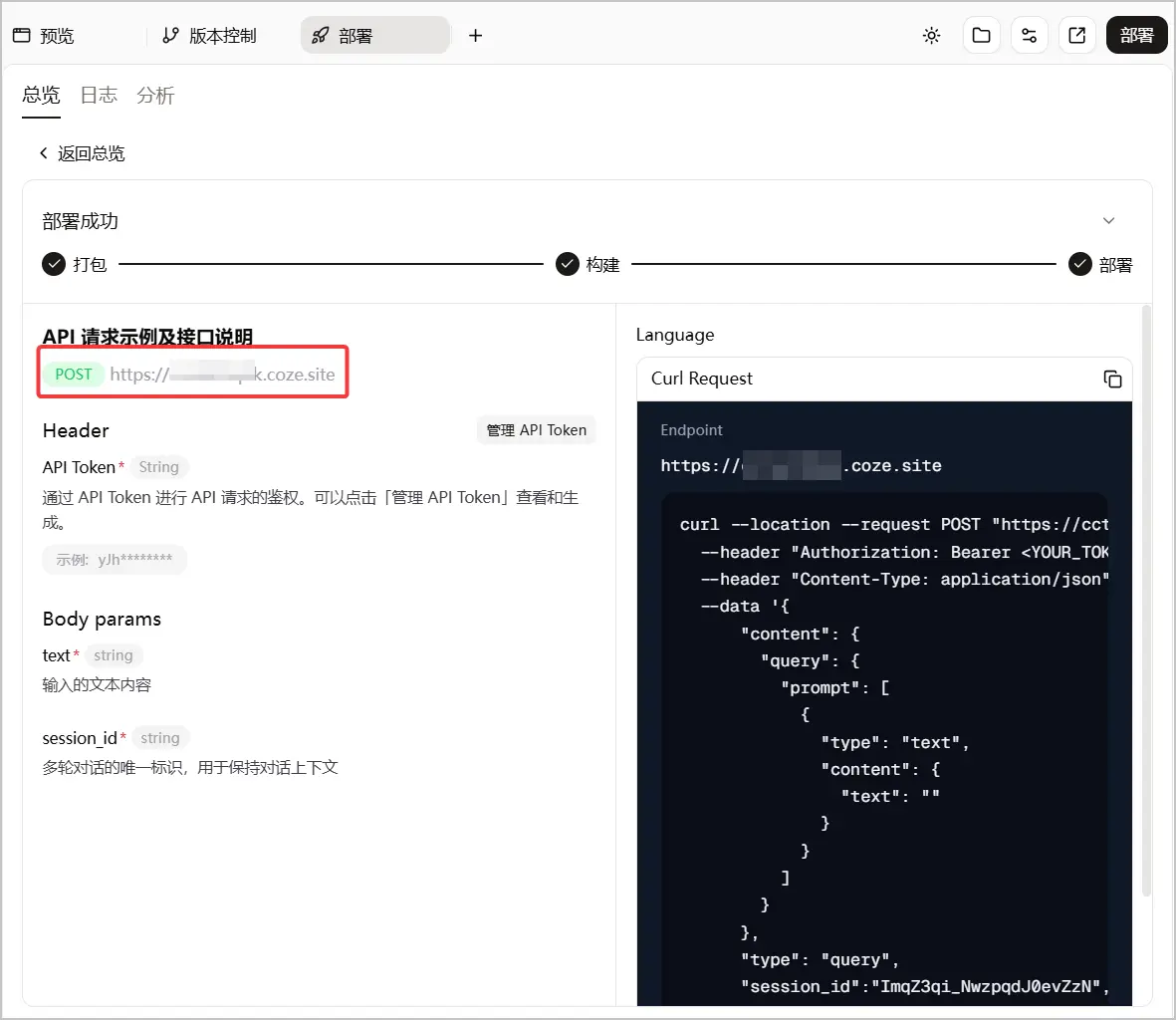
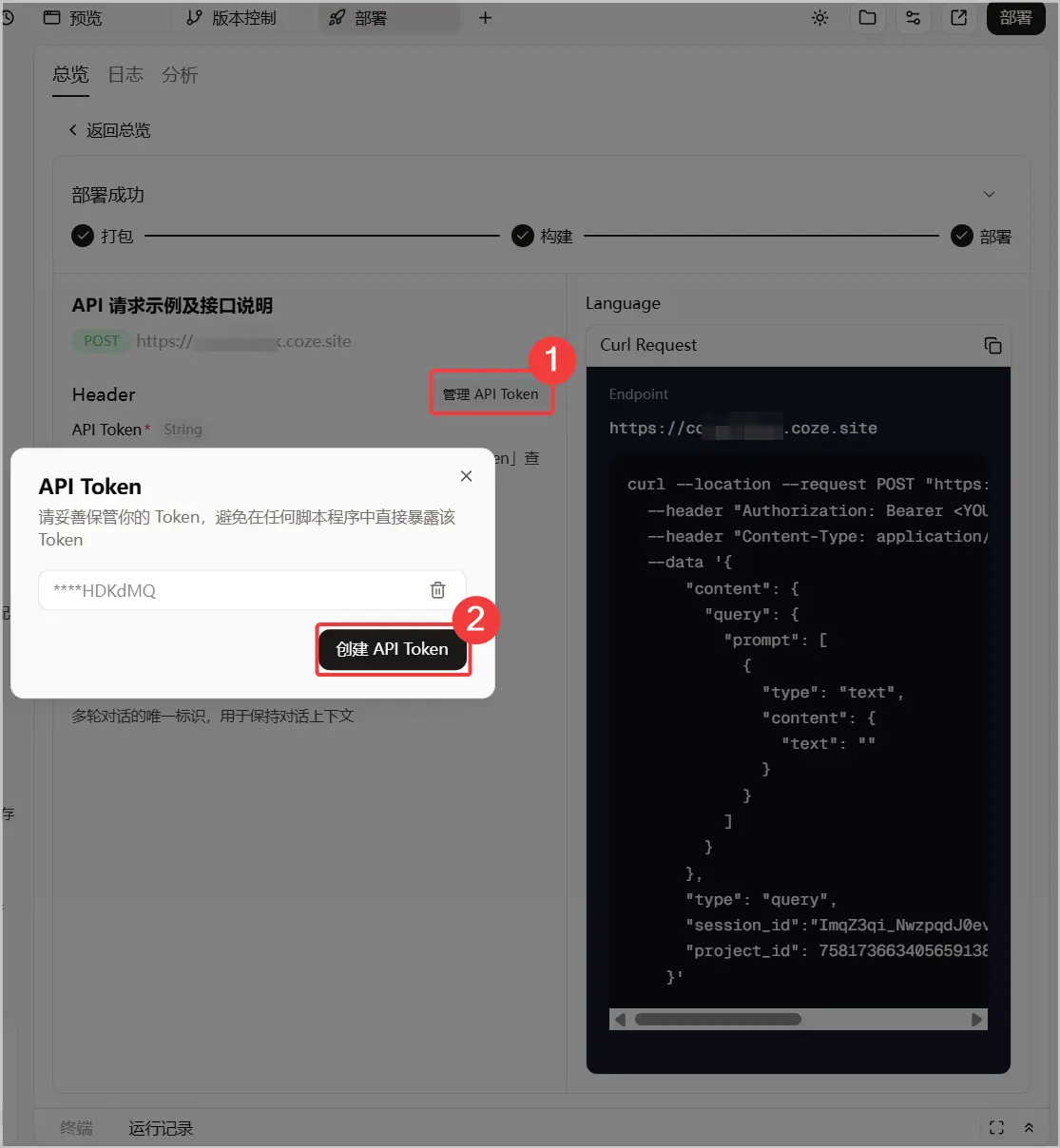
调用 API 前,你需要创建 API Token,并在请求 Header 中通过 Authorization 传入。
说明
|
API 接口 |
API请求地址 |
说明 |
|---|---|---|
| 同步执行工作流 | https://<your_domain>/run | 适用于执行时间较短(5 分钟以内)、只需要一次性获取最终结果的工作流。 |
| 流式执行工作流 | https://<your_domain>/run/stream | 适用于执行时间较长(15 分钟以内)、需要通过 SSE 事件流持续返回状态事件的工作流。 |
| 异步执行工作流 | https://<your_domain>/async_run | 适用于执行时间较长(24 小时以内)、不需要立即获取结果的工作流。调用后会先返回异步任务 ID。 |
| 查询异步执行任务状态 | https://<your_domain>/task/{task_id} | 用于根据异步任务 ID 查询任务状态、执行结果或错误信息。 |
| 查询工作流参数 | https://<your_domain>/graph_parameter | 用于查询工作流的任务状态与结果。 |
同步执行接口会在工作流执行完成后一次性返回最终结果。建议将工作流执行时间控制在 5 分钟,也就是 300 秒以内。如果服务器在 300 秒内未返回响应,连接可能因超时而中断。
对于生图、渲染等执行耗时较长的工作流,建议优先使用流式执行接口,以便持续接收进度事件并降低连接中断风险。
你可以在部署页面复制 Curl、Python 或 Node.js 调用示例。以下示例展示如何使用 Curl 调用同步执行接口:
curl --location 'https://<your_domain>/run' \
  --header 'Authorization: Bearer <YOUR_API_TOKEN>' \
  --header 'Content-Type: application/json' \
  --data '{"trigger_source":""}'
其中,请将:
同步执行接口返回工作流的最终输出,其数据结构与工作流中定义的输出参数保持一致。
{
  "send_status": "success",
  "top3_news_text": "..."
}
|
字段 |
类型 |
描述 |
|---|---|---|
| 工作流输出字段 | / | 同步执行接口直接返回工作流的最终输出。字段名称、类型和内容由当前工作流的输出参数决定。 |
流式执行接口会以 Server-Sent Events(SSE)格式持续返回事件。你可以逐条解析事件,获取工作流的开始、结束和最终完成结果的事件信息。
说明
调用该接口时,建议将工作流执行时间控制在 15 分钟,也就是 900 秒以内。为降低连接中断风险,服务端会自动发送心跳包来维持连接。 生图、生视频场景耗时较久,可能会导致接口执行超时。
你可以在部署页面复制 Curl、Python 或 Node.js 调用示例。以下示例展示如何使用 Curl 调用接口:
curl --location 'https://<your_domain>/stream_run' \
  --header 'Authorization: Bearer <YOUR_API_TOKEN>' \
  --header 'Content-Type: application/json' \
  --data '{"trigger_source":""}'
其中,请将:
如果需要获取节点开始和节点结束事件,请添加以下 Header:
--header 'x-workflow-stream-mode: debug'
id: 0
event: message
data: {"type":"node_start","timestamp":1768877934224,"log_id":"","run_id":"1878882f-f2c5-4572-9138-9a0f7b8c****","node_name":"calculator","input":{"a":1.0,"b":2.0}}

id: 1
event: message
data: {"type":"node_end","timestamp":1768877935232,"log_id":"","run_id":"1878882f-f2c5-4572-9138-9a0f7b8c****","node_name":"send_feishu_message","output":{"send_status":"success"},"time_cost_ms":1008}

id: 2
event: message
data: {"type":"workflow_end","timestamp":1768877936246,"log_id":"","run_id":"1878882f-f2c5-4572-9138-9a0f7b8c****","output":{"send_status":"success","top3_news_text":"..."},"time_cost_ms":2024}
|
字段 |
类型 |
出现事件 |
含义 |
|---|---|---|---|
| id | int | 所有事件 | 事件在响应流中的序号,从 0 开始递增。 |
| event | string | 所有事件 | 固定为 message,表示是流式推送的消息。 |
| data.type | string | 所有事件 | 事件子类型,如 node_start、node_end、done。 |
| data.timestamp | int | 所有事件 | 事件发生的时间戳(毫秒)。 |
| data.log_id | string | 所有事件 | 日志 ID,可为空。 |
| data.run_id | string | 所有事件 | 整个工作流实例的唯一标识,同一工作流内所有事件的 run_id 相同。 |
| data.node_name | string | node_start / node_end | 当前执行的节点名称。 |
| data.input | object | node_start | 节点执行时的输入参数。 |
| data.output | object | node_end / done | 节点或工作流的输出结果。 |
| data.time_cost_ms | int | node_end / done | 节点运行耗时或整个工作流总耗时(毫秒)。 |
其中,data 是流式接口的固定事件载体。data.output 中的业务字段由当前工作流或节点的输出参数决定,不同工作流可能不同。
异步执行接口会创建一个异步执行任务,并立即返回任务信息。调用端不需要一直保持连接,可以后续通过任务 ID 查询执行状态和结果。
说明
你可以在部署页面复制 Curl、Python 或 Node.js 调用示例。以下示例展示如何使用 Curl 调用接口:
curl --location 'https://<your_domain>/async_run' \
  --header 'Authorization: Bearer <YOUR_API_TOKEN>' \
  --header 'Content-Type: application/json' \
  --data '{"trigger_source":""}'
其中,请将:
{
  "task_id": "6a5fa5ade320435a9c44fd5052a3****",
  "status": "pending",
  "created_at": "2026-05-25T15:16:10.151364+08:00",
  "deadline": "2026-05-25T15:31:10.151364+08:00"
}
|
字段 |
类型 |
描述 |
|---|---|---|
| task_id | string | 异步执行任务 ID。后续查询任务状态时需要使用该 ID。 |
| status | string | 异步执行任务状态,例如 pending。 |
| created_at | string | 异步执行任务开始时间,使用 ISO 时间格式。 |
| deadline | string | 异步执行任务截止时间,使用 ISO 时间格式。 |
调用异步执行接口后,你可以使用 task_id 查询任务状态。任务完成后,接口会返回执行结果;任务失败时,接口会返回错误信息。
curl --location --request GET 'https://<your_domain>/task/{task_id}' \
  --header 'Authorization: Bearer <YOUR_API_TOKEN>'
其中,请将:
{
    "task_id": "73ba04190aa442f49155ead7fbc1****",
    "status": "running",
    "claim_count": 1,
    "created_at": "2026-05-19T06:12:49.581991+00:00",
    "started_at": "2026-05-19T06:12:49.602150+00:00",
    "completed_at": null,
    "heartbeat_at": "2026-05-19T06:23:19.947105+00:00",
    "deadline": "2026-05-20T06:12:49.577465+00:00",
    "result": null,
    "error": null
}
{
    "task_id": "73ba04190aa442f49155ead7fbc1****",
    "status": "completed",
    "claim_count": 1,
    "created_at": "2026-05-19T06:12:49.581991+00:00",
    "started_at": "2026-05-19T06:12:49.602150+00:00",
    "completed_at": "2026-05-19T06:32:49.697434+00:00",
    "heartbeat_at": null,
    "deadline": "2026-05-20T06:12:49.577465+00:00",
    "result": {
        "sum_result": 21.0
    },
    "error": null
}
|
字段 |
类型 |
说明 |
|---|---|---|
| task_id | string | 异步执行任务 ID。 |
| status | string | 异步任务状态,例如 pending、running、completed、failed、timeout。 |
| claim_count | int | 任务被执行进程领取的次数。 |
| created_at | string | 任务创建时间,ISO 时间格式。 |
| started_at | string | 任务开始时间,ISO 时间格式。 |
| completed_at | string | 任务完成时间,ISO 时间格式。 |
| heartbeat_at | string | null |
| deadline | string | 任务截止时间,ISO 时间格式。 |
| result | object | 工作流输出结果,结构由当前工作流的输出参数决定。 |
| error | string | null |
|
状态 |
说明 |
|---|---|
| pending | 任务已创建,等待被执行。 |
| running | 任务正在执行中。 |
| completed | 任务执行完成。 |
| failed | 任务执行失败。 |
| timeout | 任务执行超时。 |
查询工作流参数接口用于获取工作流的输入参数和输出参数 schema。调用工作流前,你可以先通过该接口确认请求体中需要传入哪些字段,以及每个字段的数据类型。
curl --location 'https://<your_domain>/graph_parameter' \
  --header 'Authorization: Bearer <YOUR_API_TOKEN>'
其中,请将:
{
  "input_schema": {
    "description": "工作流输入——定时触发",
    "properties": {
      "trigger_source": {
        "default": "cron",
        "description": "触发来源,默认定时任务触发",
        "title": "Trigger Source",
        "type": "string"
      }
    },
    "title": "GraphInput",
    "type": "object"
  },
  "output_schema": {
    "description": "工作流的输出",
    "properties": {
      "send_status": {
        "description": "飞书消息发送状态",
        "title": "Send Status",
        "type": "string"
      },
      "top3_news_text": {
        "description": "推送的3条关键新闻内容",
        "title": "Top3 News Text",
        "type": "string"
      }
    },
    "required": ["send_status", "top3_news_text"],
    "title": "GraphOutput",
    "type": "object"
  }
}
|
字段 |
类型 |
描述 |
|---|---|---|
| input_schema | object | 工作流的输入参数规范,包含参数名称、描述、类型和是否必填等信息。 |
| output_schema | object | 工作流的输出参数规范,包含参数名称、描述、类型和是否必填等信息。 |
如果 API 调用失败,请按以下方向排查:
/stream_run 或 /async_run。