
通过 JSON 或 YAML 文件导入插件
复制页面
本文介绍如何通过导入定义 API 的 JSON 或 YAML 文件来创建插件。创建插件后,必须发布插件才可以被低代码智能体或工作流使用。
说明
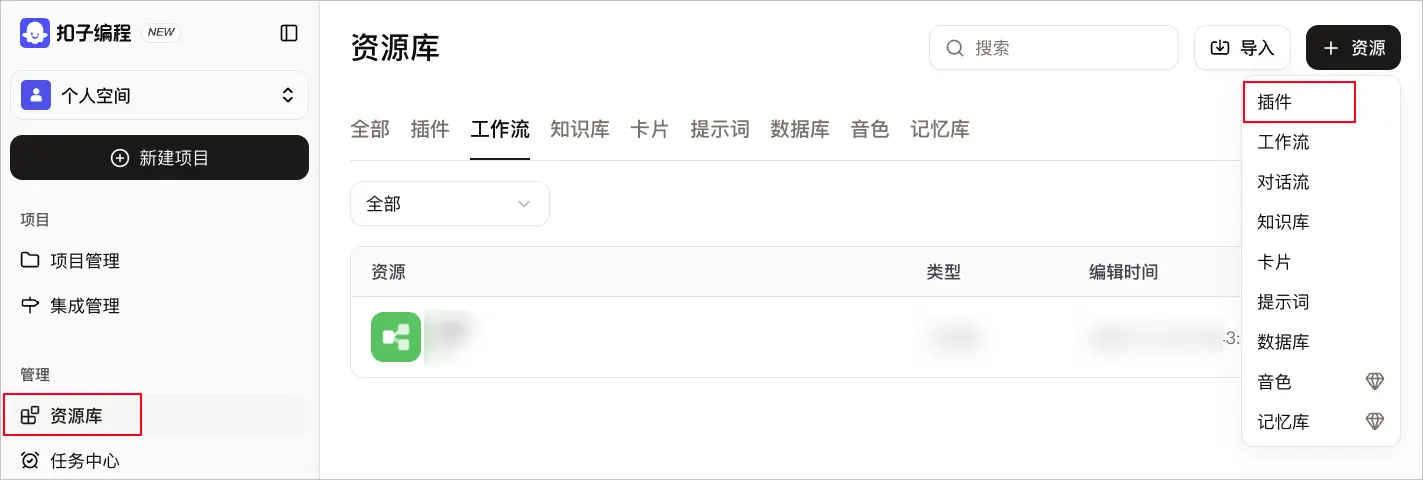
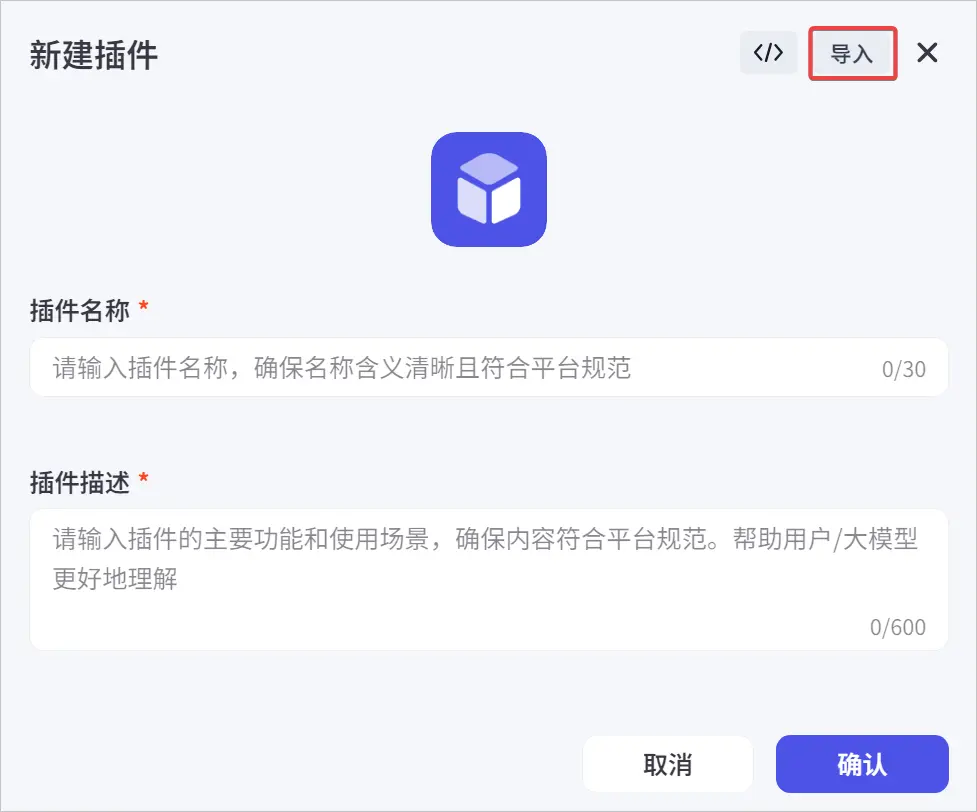
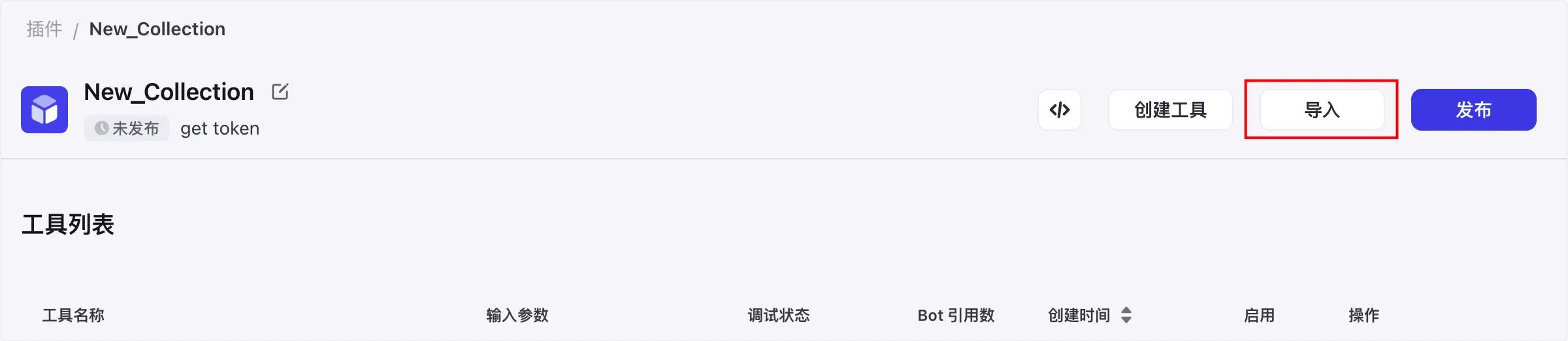
注意
如果您需要单次导入多个 API,则需要确保各个 API 有相同的 URL 路径前缀,该路径前缀将会作为插件 URL 来使用。如果单次导入的 API URL 路径前缀不一致,则会导入失败。
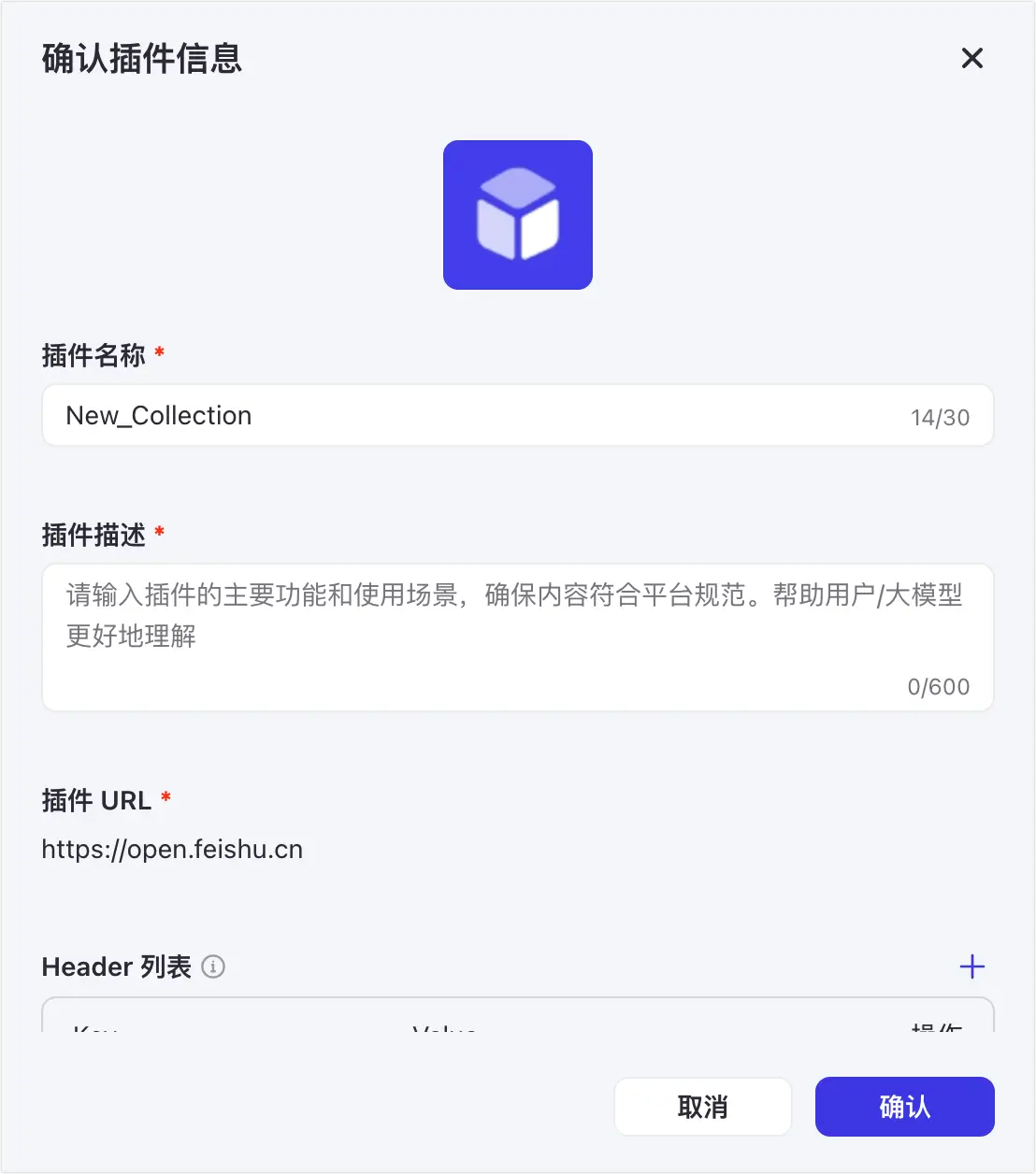
| 配置项 | 说明 |
|---|---|
| 插件图标 | 单击默认图标后,您可以上传本地图片文件作为新的图标。 |
| 插件名称 | 自定义插件名称,用于标识当前插件。建议输入清晰易理解的名称,便于大语言模型搜索与使用插件。 |
| 插件描述 | 插件的描述信息,一般用于记录当前插件的用途。 |
|
插件 URL |
插件的访问地址或相关资源的链接,不可修改,示例值 说明 插件 URL 必须为域名格式,暂不支持 IP 格式的 URL 地址。 |
| Header 列表 | HTTP 请求头参数列表。 |
|
授权方式 |
选择插件内 API 的鉴权方式。目前支持以下三种:
|
说明
导入插件后,插件内的工具默认未启用且未通过调试,因此您需要先启用工具并通过调试。
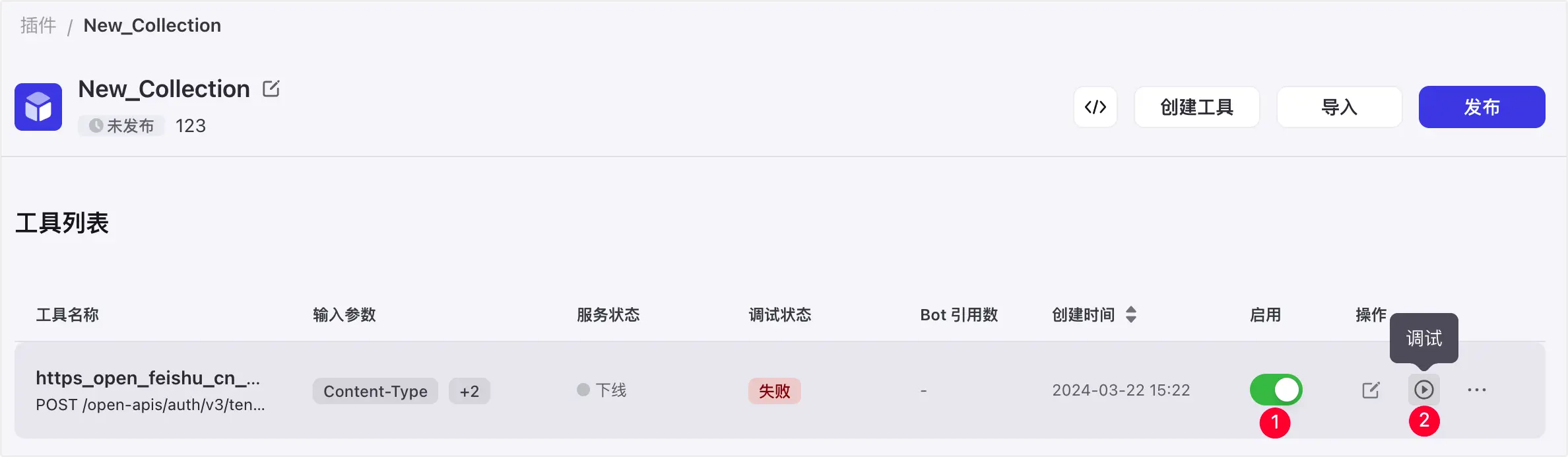
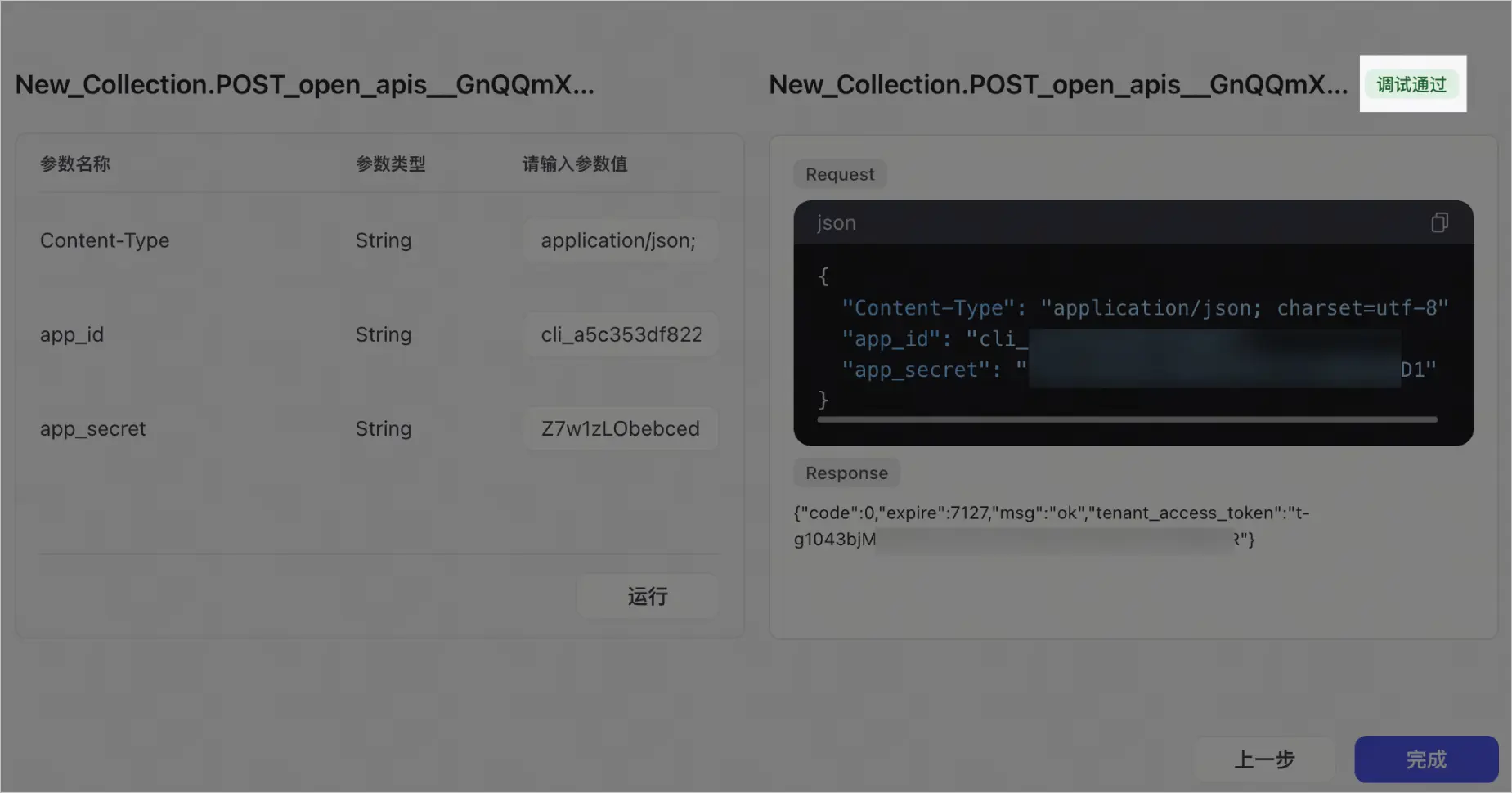
你可以将插件上架到扣子插件商店或企业插件商店。不能同时上架扣子插件商店和企业插件商店,仅支持选择其中一个渠道。
info:
    description: httpbin apis
    title: Httpbin APIs
    version: v1
openapi: 3.0.1
paths:
    /get:
        get:
            operationId: get
            parameters:
                - description: name
                  in: query
                  name: name
                  schema:
                    type: string
            requestBody:
                content:
                    application/json:
                        schema:
                            type: object
            responses:
                "200":
                    content:
                        application/json:
                            schema:
                                properties:
                                    args:
                                        properties:
                                            name:
                                                type: string
                                        type: object
                                type: object
                    description: new desc
                default:
                    description: ""
            summary: API to get
    /post:
        post:
            operationId: post
            requestBody:
                content:
                    application/json:
                        schema:
                            properties:
                                A:
                                    description: A
                                    type: string
                                B:
                                    description: B
                                    type: integer
                            type: object
            responses:
                "200":
                    content:
                        application/json:
                            schema:
                                properties:
                                    json:
                                        properties:
                                            A:
                                                type: string
                                            B:
                                                type: number
                                        type: object
                                type: object
                    description: new desc
                default:
                    description: ""
            summary: API to get
    /put:
        put:
            operationId: put
            requestBody:
                content:
                    application/json:
                        schema:
                            properties:
                                value:
                                    description: value
                                    type: string
                            type: object
            responses:
                "200":
                    content:
                        application/json:
                            schema:
                                properties:
                                    json:
                                        properties:
                                            value:
                                                type: string
                                        type: object
                                type: object
                    description: new desc
                default:
                    description: ""
            summary: API to put
servers:
    - url: https://httpbin.org
swagger: "2.0"
info:
  description: "This is a sample server Petstore server.  You can find out more about     Swagger at [http://swagger.io](http://swagger.io) or on [irc.freenode.net, #swagger](http://swagger.io/irc/).      For this sample, you can use the api key `special-key` to test the authorization     filters."
  version: "1.0.0"
  title: "Swagger_Petstore_Sample"
  termsOfService: "http://swagger.io/terms/"
  contact:
    email: "apiteam@swagger.io"
  license:
    name: "Apache 2.0"
    url: "http://www.apache.org/licenses/LICENSE-2.0.html"
host: "petstore.swagger.io"
basePath: "/v2"
tags:
- name: "pet"
  description: "Everything about your Pets"
  externalDocs:
    description: "Find out more"
    url: "http://swagger.io"
- name: "store"
  description: "Access to Petstore orders"
- name: "user"
  description: "Operations about user"
  externalDocs:
    description: "Find out more about our store"
    url: "http://swagger.io"
schemes:
- "https"
- "http"
paths:
  /pet:
    post:
      tags:
      - "pet"
      summary: "Add a new pet to the store"
      description: ""
      operationId: "addPet"
      consumes:
      - "application/json"
      - "application/xml"
      produces:
      - "application/xml"
      - "application/json"
      parameters:
      - in: "body"
        name: "body"
        description: "Pet object that needs to be added to the store"
        required: true
        schema:
          $ref: "#/definitions/Pet"
      responses:
        "400":
          description: Invalid input
        "422":
          description: Validation exception
      security:
      - petstore_auth:
        - "write:pets"
        - "read:pets"
    put:
      tags:
      - "pet"
      summary: "Update an existing pet"
      description: ""
      operationId: "updatePet"
      consumes:
      - "application/json"
      - "application/xml"
      produces:
      - "application/xml"
      - "application/json"
      parameters:
      - in: "body"
        name: "body"
        description: "Pet object that needs to be added to the store"
        required: true
        schema:
          $ref: "#/definitions/Pet"
      responses:
        "400":
          description: "Invalid ID supplied"
        "404":
          description: "Pet not found"
        "422":
          description: "Validation exception"
      security:
      - petstore_auth:
        - "write:pets"
        - "read:pets"
  /pet/findByStatus:
    get:
      tags:
      - "pet"
      summary: "Finds Pets by status"
      description: "Multiple status values can be provided with comma separated strings"
      operationId: "findPetsByStatus"
      produces:
      - "application/xml"
      - "application/json"
      parameters:
      - name: "status"
        in: "query"
        description: "Status values that need to be considered for filter"
        required: true
        type: "array"
        items:
          type: "string"
          enum:
          - "available"
          - "pending"
          - "sold"
          default: "available"
        collectionFormat: "multi"
      responses:
        "400":
          description: "Invalid status value"
      security:
      - petstore_auth:
        - "write:pets"
        - "read:pets"
  /pet/{petId}:
    get:
      tags:
      - "pet"
      summary: "Find pet by ID"
      description: "Returns a single pet"
      operationId: "getPetById"
      produces:
      - "application/xml"
      - "application/json"
      parameters:
      - name: "petId"
        in: "path"
        description: "ID of pet to return"
        required: true
        type: "integer"
        format: "int64"
      responses:
        "200":
          description: "successful operation"
          schema:
            $ref: "#/definitions/Pet"
        "400":
          description: "Invalid ID supplied"
        "404":
          description: "Pet not found"
      security:
      - api_key: []
    post:
      tags:
      - "pet"
      summary: "Updates a pet in the store with form data"
      description: ""
      operationId: "updatePetWithForm"
      consumes:
      - "application/x-www-form-urlencoded"
      produces:
      - "application/xml"
      - "application/json"
      parameters:
      - name: "petId"
        in: "path"
        description: "ID of pet that needs to be updated"
        required: true
        type: "integer"
        format: "int64"
      - name: "name"
        in: "formData"
        description: "Updated name of the pet"
        required: false
        type: "string"
      - name: "status"
        in: "formData"
        description: "Updated status of the pet"
        required: false
        type: "string"
      responses:
        "400":
          description: Invalid input
        "422":
          description: Validation exception
      security:
      - petstore_auth:
        - "write:pets"
        - "read:pets"
    delete:
      tags:
      - "pet"
      summary: "Deletes a pet"
      description: ""
      operationId: "deletePet"
      produces:
      - "application/xml"
      - "application/json"
      parameters:
      - name: "api_key"
        in: "header"
        required: false
        type: "string"
      - name: "petId"
        in: "path"
        description: "Pet id to delete"
        required: true
        type: "integer"
        format: "int64"
      responses:
        "400":
          description: "Invalid ID supplied"
        "404":
          description: "Pet not found"
      security:
      - petstore_auth:
        - "write:pets"
        - "read:pets"
securityDefinitions:
  petstore_auth:
    type: "oauth2"
    authorizationUrl: "http://petstore.swagger.io/oauth/dialog"
    flow: "implicit"
    scopes:
      write:pets: "modify pets in your account"
      read:pets: "read your pets"
  api_key:
    type: "apiKey"
    name: "api_key"
    in: "header"
definitions:
  Order:
    type: "object"
    properties:
      id:
        type: "integer"
        format: "int64"
      petId:
        type: "integer"
        format: "int64"
      quantity:
        type: "integer"
        format: "int32"
      shipDate:
        type: "string"
        format: "date-time"
      status:
        type: "string"
        description: "Order Status"
        enum:
        - "placed"
        - "approved"
        - "delivered"
      complete:
        type: "boolean"
        default: false
    xml:
      name: "Order"
  Category:
    type: "object"
    properties:
      id:
        type: "integer"
        format: "int64"
      name:
        type: "string"
    xml:
      name: "Category"
  User:
    type: "object"
    properties:
      id:
        type: "integer"
        format: "int64"
      username:
        type: "string"
      firstName:
        type: "string"
      lastName:
        type: "string"
      email:
        type: "string"
      password:
        type: "string"
      phone:
        type: "string"
      userStatus:
        type: "integer"
        format: "int32"
        description: "User Status"
    xml:
      name: "User"
  Tag:
    type: "object"
    properties:
      id:
        type: "integer"
        format: "int64"
      name:
        type: "string"
    xml:
      name: "Tag"
  Pet:
    type: "object"
    required:
    - "name"
    - "photoUrls"
    properties:
      id:
        type: "integer"
        format: "int64"
      category:
        $ref: "#/definitions/Category"
      name:
        type: "string"
        example: "doggie"
      photoUrls:
        type: "array"
        xml:
          name: "photoUrl"
          wrapped: true
        items:
          type: "string"
      tags:
        type: "array"
        xml:
          name: "tag"
          wrapped: true
        items:
          $ref: "#/definitions/Tag"
      status:
        type: "string"
        description: "pet status in the store"
        enum:
        - "available"
        - "pending"
        - "sold"
    xml:
      name: "Pet"
  ApiResponse:
    type: "object"
    properties:
      code:
        type: "integer"
        format: "int32"
      type:
        type: "string"
      message:
        type: "string"
externalDocs:
  description: "Find out more about Swagger"
  url: "http://swagger.io"
通过 Postman Collection 导出的 json 文件,可以直接导入并创建插件。需要注意的是,request body 和 response body 都只支持 application/json 格式。
{
    "info": {
        "_postman_id": "21b585a5-e8b2-41ea-b2d0-6e4f9c703abf",
        "name": "REST API CRUD",
        "description": "# 🚀 This template guides you through CRUD operations (GET, POST, PUT, DELETE), variables, and tests.",
        "schema": "https://schema.getpostman.com/json/collection/v2.1.0/collection.json",
        "_exporter_id": "32482447"
    },
    "item": [
        {
            "name": "Get data",
            "request": {
                "method": "GET",
                "header": [
                    {
                        "key": "Connection",
                        "value": "Keep-Alive"
                    }
                ],
                "url": {
                    "raw": "{{base_url}}/get?city=beijing&type=park",
                    "host": [
                        "{{base_url}}"
                    ],
                    "path": [
                        "get"
                    ],
                    "query": [
                        {
                            "key": "city",
                            "value": "beijing"
                        },
                        {
                            "key": "type",
                            "value": "park"
                        }
                    ]
                },
                "description": "This is a GET request and it is used to \"get\" data from an endpoint. There is no request body for a GET request."
            },
            "response": []
        },
        {
            "name": "Post data",
            "request": {
                "method": "POST",
                "header": [],
                "body": {
                    "mode": "raw",
                    "raw": "{\"B\": \"b\", \"C\": 1, \"D\": true, \"E\": {\"F\": 2}, \"G\": [\"g\"]}",
                    "options": {
                        "raw": {
                            "language": "json"
                        }
                    }
                },
                "url": {
                    "raw": "{{base_url}}/post?city=beijing&type=park",
                    "host": [
                        "{{base_url}}"
                    ],
                    "path": [
                        "post"
                    ],
                    "query": [
                        {
                            "key": "city",
                            "value": "beijing"
                        },
                        {
                            "key": "type",
                            "value": "park"
                        }
                    ]
                },
                "description": "This is a POST request, submitting JSON data to an API via the request body."
            },
            "response": []
        },
        {
            "name": "Update data",
            "request": {
                "method": "PUT",
                "header": [],
                "body": {
                    "mode": "raw",
                    "raw": "{\"B\": \"b\", \"C\": 1, \"D\": true, \"E\": {\"F\": 2}, \"G\": [\"g\"]}",
                    "options": {
                        "raw": {
                            "language": "json"
                        }
                    }
                },
                "url": {
                    "raw": "{{base_url}}/put?city=beijing&type=park",
                    "host": [
                        "{{base_url}}"
                    ],
                    "path": [
                        "put"
                    ],
                    "query": [
                        {
                            "key": "city",
                            "value": "beijing"
                        },
                        {
                            "key": "type",
                            "value": "park"
                        }
                    ]
                },
                "description": "This is a PUT request and it is used to overwrite an existing piece of data."
            },
            "response": []
        }
    ],
    "variable": [
        {
            "key": "base_url",
            "value": "https://httpbin.org/"
        }
    ]
}
使用 API 的 YAML 文件导入插件时,如果提示 invalid parameter ,请根据如下步骤排查: