
导入与导出低代码工作流
复制页面
低代码工作流(包含对话流)支持导出为 Zip 格式的压缩包。开发者下载该压缩包到本地后,可根据业务需求编辑文件。编辑完成后,再将该压缩包灵活导入至任意工作空间来创建一个新的低代码工作流。
说明
工作流的导出与导入功能适用于历史版本管理或跨空间、跨账号复制工作流等场景需求。
工作流导出操作支持基础模式和高级模式,两者在导出内容上存在差异,具体说明如下:
| 对比项 | 基础模式 | 高级模式 |
|---|---|---|
| 导出 HTTP 节点的鉴权信息 | 支持 | 支持 |
|
导出引用资源 |
不支持 |
支持导出子工作流 每次导出工作流时,最多同步导出 40 个子工作流。 |
| 同空间导入 | 工作流的知识库、数据库、私有插件、子工作流配置均不受影响,可正常运行。 | 工作流的知识库、数据库、私有插件、子工作流配置均不受影响,可正常运行。 |
| 跨空间导入 | 工作流的知识库、数据库、私有插件、子工作流配置均失效,需重新选择所在空间内的资源。 | 子工作流可正常运行,知识库、数据库、私有插件仍不支持跨空间导入,需要重新选择所在空间内的资源。 |
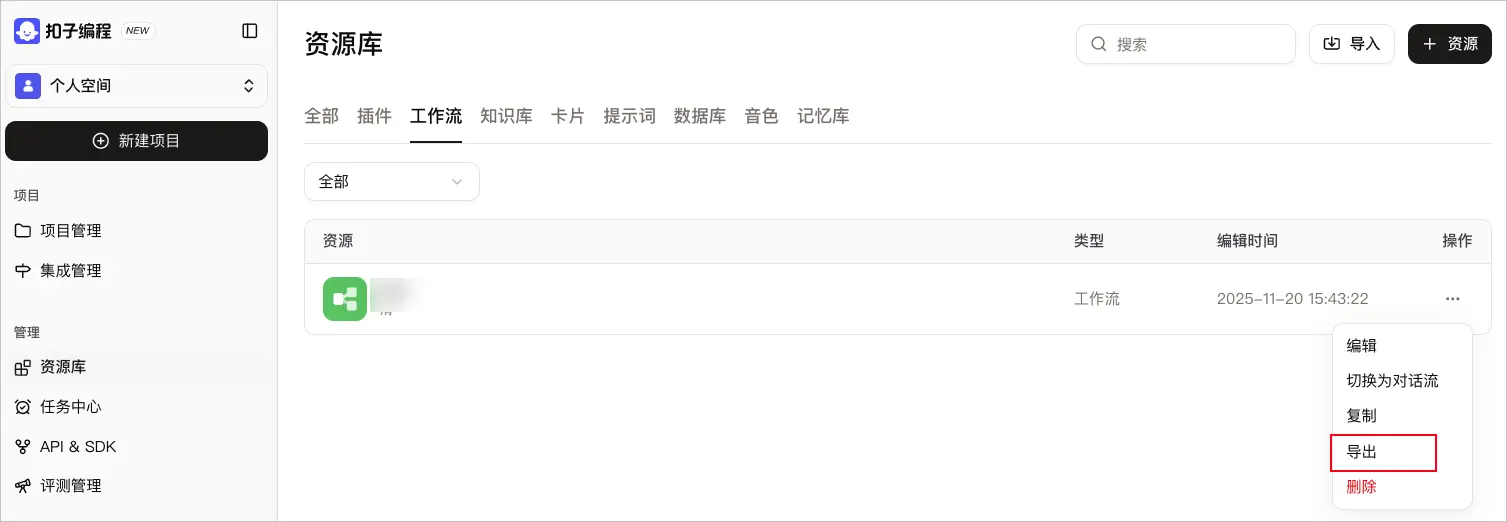
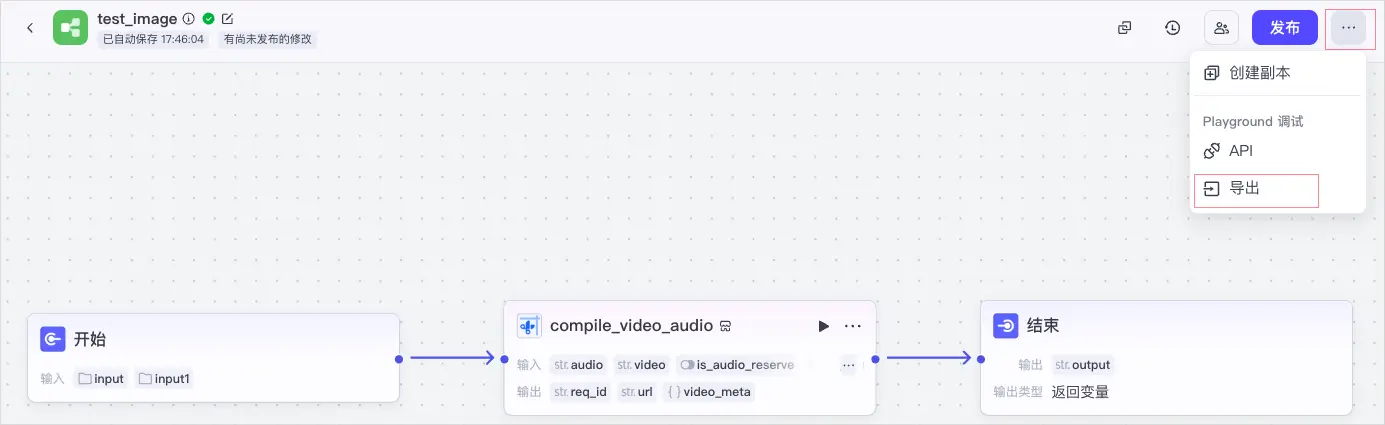
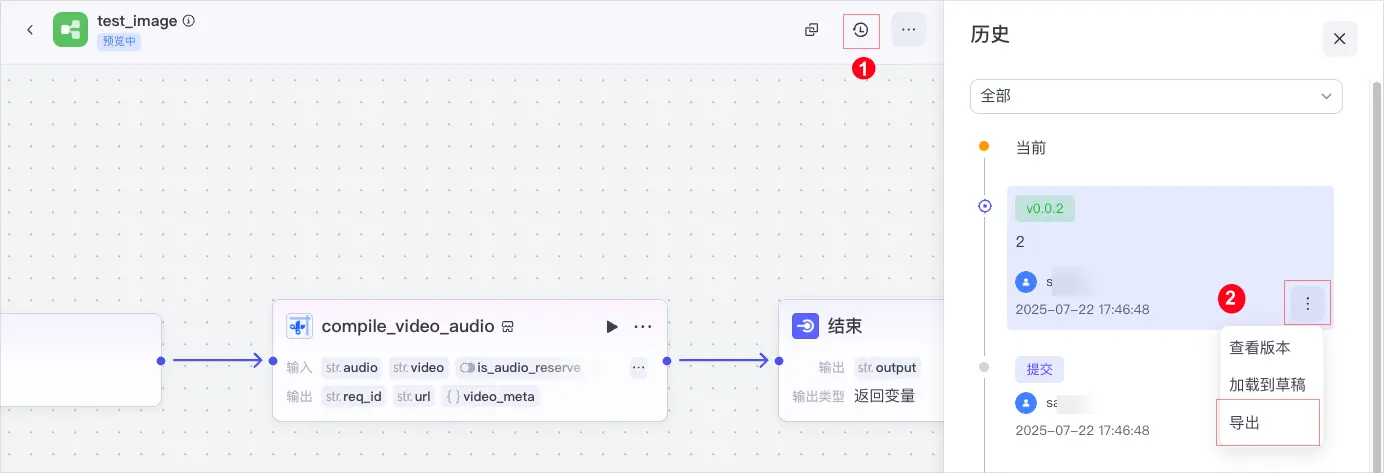
你可以在资源库列表页面、工作流编排页面或发布历史列表页面,单击导出,导出工作流。
Workflow-${工作流名称}-draft-随机数.zip 。Workflow-${工作流名称}-commit-随机数.zip,发布版本工作流的压缩包名称为 Workflow-${工作流名称}-${工作流版本号}-随机数.zip。说明
在导出过程中,请勿删除任务,删除任务将导致导出失败。
资源库列表页面
工作流编排页面
发布历史列表页面
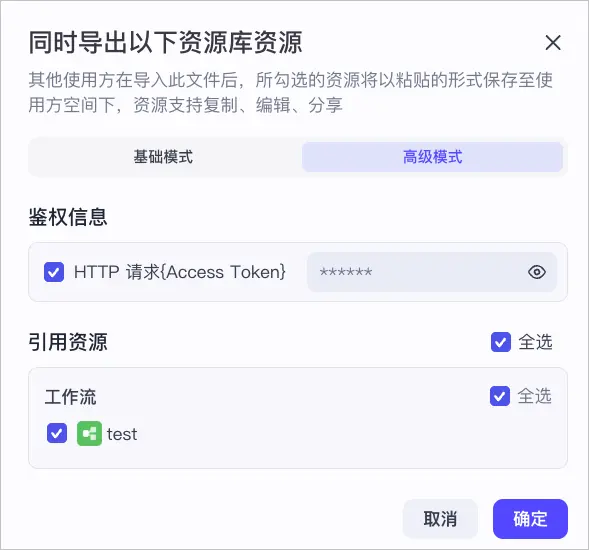
在同时导出以下资源库资源对话框中,你可选择随工作流同步导出的资源。当前,高级模式支持导出 HTTP 节点的鉴权信息和工作流所绑定的子工作流。
注意
如果工作流中包含 HTTP 节点的鉴权信息,请谨慎选择,避免泄露。
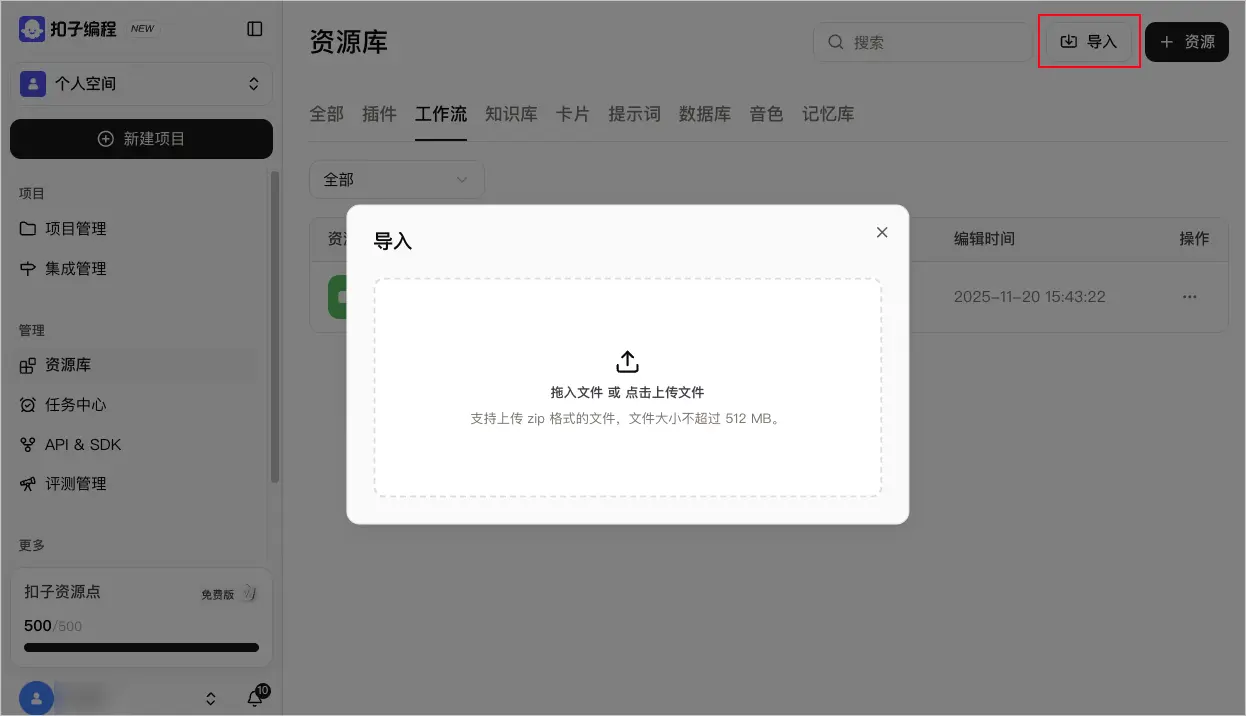
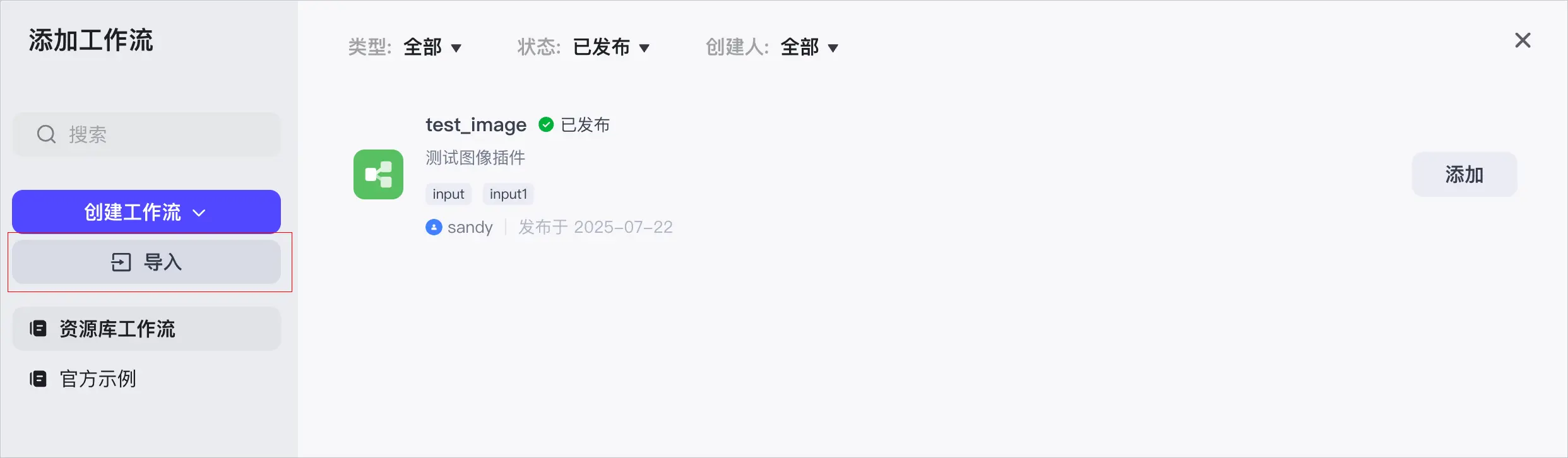
你可以在资源库列表页面、智能体编排页面,单击导入,导入工作流。导入时,你需要上传已导出的工作流 Zip 压缩包,系统将自动读取压缩包内的信息,预填工作流的名称和描述。导入完成后,即可实现工作流的完整复制。
说明
资源库列表页面
智能体编排页面
导出工作流压缩文件后,你可以在本地解压并编辑其中的工作流文件,实现工作流的本地编排。编辑完成后,再重新导入到扣子编程。
压缩包中包含如下文件及文件夹。
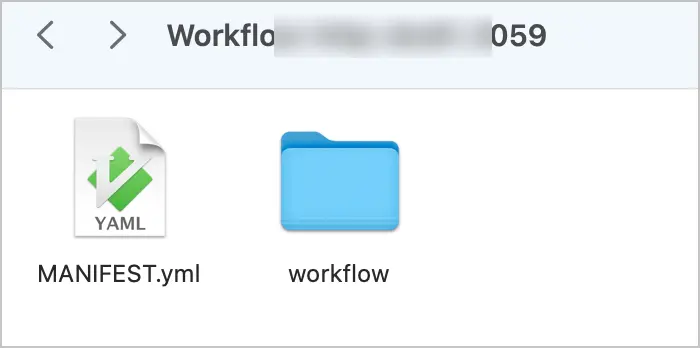
MANIFEST.yml 文件:工作流的配置文件。workflow 文件夹:包含以${工作流名称} 开头的yaml 文件,表示工作流的 DSL 文件,定义了工作流的详细数据结构和编排逻辑。如果同步导出子工作流,则压缩包中还会包含子工作流的 DSL 文件。说明
在本地编辑文件时,请勿修改界面上不支持变更的内容(如开始节点名称、节点图标等)。否则,将导致重新导入时校验失败,无法导入。
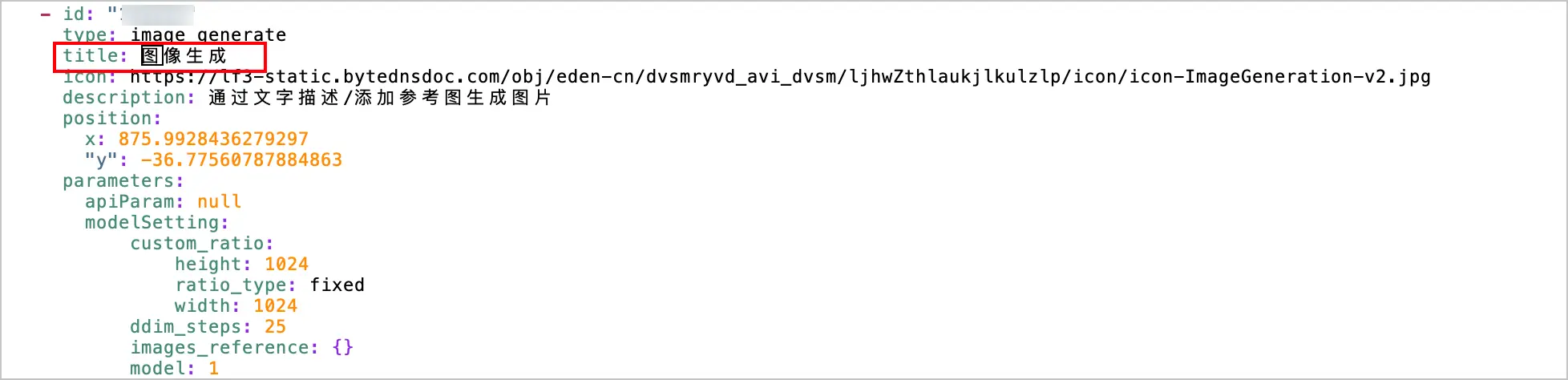
你可以在 workflow 文件夹中,打开 yaml 文件进行编辑。
例如要修改图像生成节点的名称,你可在 DSL 文件的 nodes 部分,通过节点类型(image_generate)找到图像生成节点,并将该节点的 title 字段值更改为图片节点。重新导入工作流到扣子编程后,新工作流中的图像生成节点将重名命为图片节点。
下载工作流压缩包后,你可以参考本章节罗列的工作流元数据 DSL 结构、字段说明及配置说明,编辑文件。
以 YAML 格式展示工作流的 DSL 结构,包括工作流名称、描述、模式、图标、语法版本、节点和连线等定义。
schema_version: 1.0.0
name: summarize_article_1_783
id: 7482702358159*****
description: 示例:总结提炼文章中的要点
mode: workflow
icon: plugin_icon/workflow.png
nodes:
    - id: "100001"
      type: start
      title: 开始
      icon: https://lf3-static.bytednsdoc.com/obj/eden-cn/dvsmryvd_avi_dvsm/ljhwZthlaukjlkulzlp/icon/icon-Start-v2.jpg
      description: 工作流的起始节点,用于设定启动工作流需要的信息
      position:
        x: 180
        "y": 39.7
      parameters:
        node_outputs:
            article_url:
                type: string
                required: true
                description: 文章的链接地址
    - id: "900001"
      type: end
      title: 结束
      icon: https://lf3-static.bytednsdoc.com/obj/eden-cn/dvsmryvd_avi_dvsm/ljhwZthlaukjlkulzlp/icon/icon-End-v2.jpg
      description: 工作流的最终节点,用于返回工作流运行后的结果信息
      position:
        x: 1560
        "y": 26.700000000000003
      parameters:
        node_inputs:
            - name: topic
              input:
                type: string
                value:
                    path: topic
                    ref_node: "197398"
            - name: event_or_opinion
              input:
                type: list
                items:
                    type: object
                    properties:
                        detail:
                            type: string
                            description: 每个事件下的详情或观点下的依据
                        event_or_opinion:
                            type: string
                            description: 事件或观点
                value:
                    path: event_or_opinion
                    ref_node: "197398"
            - name: point
              input:
                type: list
                items:
                    type: string
                value:
                    path: point
                    ref_node: "197398"
            - name: summary
              input:
                type: string
                value:
                    path: summary
                    ref_node: "197398"
        terminatePlan: returnVariables
    - id: "140349"
      type: plugin
      title: 读取网页内容
      icon: https://lf3-static.bytednsdoc.com/obj/eden-cn/dvsmryvd_avi_dvsm/ljhwZthlaukjlkulzlp/icon/icon-Api.png
      description: 当你需要获取网页、pdf、抖音视频内容时,使用此工具。可以获取url链接下的标题和内容。
      position:
        x: 640
        "y": 26
      parameters:
        apiParam:
            - name: apiID
              input:
                type: string
                value: "7379227817307029513"
            - name: apiName
              input:
                type: string
                value: "LinkReaderPlugin"
            - name: pluginID
              input:
                type: string
                value: "7379227817307013129"
            - name: pluginName
              input:
                type: string
                value: "链接读取"
            - name: pluginVersion
              input:
                type: string
                value: ""
            - name: tips
              input:
                type: string
                value: ""
            - name: outDocLink
              input:
                type: string
                value: ""
            - name: updateTime
              input:
                type: integer
                value: 1.750141501e+09
        node_inputs:
            - name: url
              input:
                value:
                    path: article_url
                    ref_node: "100001"
        node_outputs:
            code:
                type: integer
                description: 错误码
            data:
                type: object
                properties:
                    content:
                        type: string
                    images:
                        type: list
                        items:
                            type: object
                            properties:
                                alt:
                                    type: string
                                height:
                                    type: integer
                                title:
                                    type: string
                                url:
                                    type: string
                                width:
                                    type: integer
                    title:
                        type: string
                description: 网页的内容
            err_msg:
                type: string
                description: 错误信息
            error_code:
                type: string
                description: 错误码
            error_msg:
                type: string
                description: 错误信息
            message:
                type: string
                description: 错误信息
            pdf_content:
                type: string
                description: pdf的内容
        settingOnError:
            processType: 1
            retryTimes: 0
            timeoutMs: 180000
    - id: "197398"
      type: llm
      title: 文章提炼
      icon: https://lf3-static.bytednsdoc.com/obj/eden-cn/dvsmryvd_avi_dvsm/ljhwZthlaukjlkulzlp/icon/icon-LLM-v2.jpg
      description: 调用大语言模型,使用变量和提示词生成回复
      version: "3"
      position:
        x: 1100
        "y": 0
      parameters:
        llmParam:
            - name: temperature
              input:
                type: float
                value: "1"
            - name: topP
              input:
                type: float
                value: "0.7"
            - name: responseFormat
              input:
                type: integer
                value: "2"
            - name: maxTokens
              input:
                type: integer
                value: "1024"
            - name: modelName
              input:
                type: string
                value: 豆包·工具调用
            - name: modelType
              input:
                type: integer
                value: "1706077826"
            - name: generationDiversity
              input:
                type: string
                value: balance
            - name: prompt
              input:
                type: string
                value: ' '
            - name: enableChatHistory
              input:
                type: boolean
                value: false
            - name: chatHistoryRound
              input:
                type: integer
                value: "3"
            - name: systemPrompt
              input:
                type: string
                value: |
                    你是一个专业的文章阅读助手,请阅读以下文章,按照要求进行完整的总结。

                    ==原始内容==

                    {{input}}

                    ====End======

                    要求:
                    1. 文章主题。(一个主题)
                    2. 事件或观点。(判断文章是在讲新的事件还是发表观点,三至五个核心事件或观点,如果事件和观点都存在,可以放在一句话里)
                    3. 事件详情或观点依据。(每个事件或观点提炼2-4个详情或依据)
                    4. 重要金句或反常识的观点(1-4个)
                    5. 整体总结。用初中学生能听的懂的方式简练总结。
            - name: stableSystemPrompt
              input:
                type: string
                value: ""
        node_inputs:
            - name: input
              input:
                value:
                    path: data.content
                    ref_node: "140349"
        node_outputs:
            event_or_opinion:
                type: list
                items:
                    type: object
                    properties:
                        detail:
                            type: string
                            description: 每个 事件下的详情或观点下的依据
                        event_or_opinion:
                            type: string
                            description: 事件或观点
                description: 事件或观点
            point:
                type: list
                items:
                    type: string
                description: 重要金句或反常识的观点
            summary:
                type: string
                description: 整体总结
            topic:
                type: string
                description: 文章主题
        settingOnError:
            processType: 1
            retryTimes: 0
            switch: false
            timeoutMs: 600000
    - id: "157201"
      type: comment
      title: ""
      icon: ""
      description: ""
      position:
        x: 577.7948051948052
        "y": 207.6188311688312
      size:
        width: 235.61688311688312
        height: 80
      parameters:
        note: '[{"type":"paragraph","children":[{"text":"在流程中调用读取插件,将文本传递给大模型节点来提炼标题、总结、关键信息点","type":"text"}]}]'
        schemaType: slate
edges:
    - source_node: "100001"
      target_node: "140349"
    - source_node: "197398"
      target_node: "900001"
    - source_node: "140349"
      target_node: "197398"
工作流基础字段说明如下表所示,包括工作流名称、描述、类型、图标等定义。
| 名称 | 数据类型 | 是否必填 | 描述 |
|---|---|---|---|
| schema_version | String | 是 | 当前语法的版本,固定为 1.0.0,请勿修改。 |
| name | String | 是 | 工作流的名称。 |
| description | String | 是 | 工作流的描述。 |
| mode | String | 是 | 工作流的类型。 |
| icon | String | 是 | 工作流的图标,请勿修改。 |
| nodes | Array | 是 | 工作流节点列表。 |
|
edges |
Array |
是 |
工作流节点之间的连线。 edges 子字段说明,请参考edges 字段。 |
节点相关的字段说明如下表所示,包括工作流节点 ID、类型、位置、描述、批处理、异常处理等定义。
| 名称 | 数据类型 | 是否必填 | 描述 |
|---|---|---|---|
| id | string | 是 | 工作流节点 ID。 |
|
type |
string |
是 |
工作流节点类型。可选值如下:
|
| title | string | 是 | 工作流节点的标题。 |
| icon | String | 是 | 工作流节点的图标。 |
| description | string | 是 | 工作流节点的描述。 |
|
position |
object |
是 |
节点在画布中的位置,包括如下字段:
系统在初始画布的正中间设有一个 |
|
canvasPosition |
object |
否 |
子画布的位置,只有循环节点和批处理节点支持该配置。包括如下字段:
|
| parameters | object | 是 | 工作流节点的配置信息,可参考各个工作流节点文档,例如开始和结束节点。 |
|
parameters.node_inputs |
object |
是 |
工作流节点输入参数。 node_inputs 子字段说明,请参考node_inputs 字段。 |
| parameters.batch | array | 否 | 批处理的输入参数配置。 |
|
parameters.settingOnError |
object |
否 |
异常处理配置。 settingOnError 子字段说明,请参考settingOnError 字段。 |
|
parameters.node_outputs |
object |
否 |
工作流节点输出参数配置。 node_outputs 子字段说明,请参考node_outputs 字段。 |
node_inputs 字段表示工作流节点的输入参数,其子字段说明如下表所示。
| 名称 | 数据类型 | 是否必填 | 说明 |
|---|---|---|---|
| $key | string | 是 | 对象中的属性名称。 |
| $value | object | 是 | 描述对象属性的结构信息。 |
| $value.type | string | 是 | 对象属性的数据类型,详情请参考数据类型说明。 |
| $value.required | boolean | 是 | 具体的对象属性是否必填。 |
| $value.items | object | 否 | 数组类型的嵌套结构。 |
settingOnError 字段表示工作流异常处理配置,其子字段说明如下表所示。其中,详细的配置说明可参考各个工作流节点文档,如异常处理。
| 名称 | 数据类型 | 是否必填 | 说明 |
|---|---|---|---|
| switch | boolean | 否 | 是否开启异常处理配置。 |
|
processType |
integer |
否 |
异常处理方式,可选值:
|
| timeoutMs | integer | 否 | 超时时间。 |
| retryTimes | integer | 否 | 重试次数。 |
node_outputs 字段表示工作流节点的输出参数,其子字段说明如下表所示。
| 名称 | 数据类型 | 是否必填 | 说明 |
|---|---|---|---|
| type | string | 是 | 数据类型,详情请参考数据类型说明。 |
| properties | object | 否 | 一个对象的属性集合。 |
| properties.$key | string | 是 | 属性名称。 |
| properties.$value.type | string | 是 | 属性的数据类型,详情请参考数据类型说明。 |
| properties.$value.required | boolean | 是 | 属性是否必填。 |
| items | object | 否 | 数组类型的嵌套结构。 |
参数的数据类型说明如下表所示。
| 关键字 | 名称 |
|---|---|
| string | 字符串 |
| integer | 整数 |
| number | 数字 |
| boolean | 布尔 |
| time | 时间 |
| object | 对象 |
| array | 数组 |
| file | 文件 |
| image | 图片 |
| svg | SVG |
| audio | 音频 |
| video | 视频 |
| voice | 音色 |
| doc | 文档 |
| ppt | PPT |
| excel | 表格 |
| txt | 文本 |
| code | 代码 |
| zip | 压缩包 |
edges 字段表示节点之间连线,其子字段如下表所示。
| 名称 | 数据类型 | 是否必填 | 描述 |
|---|---|---|---|
| source_node | String | 是 | 连线开始节点的 ID。 |
| target_node | String | 是 | 连线结束节点的 ID。 |
| source_port | String | 否 | 连线开始节点的分支 ID。 |
工作流节点中的大部分输入参数支持配置为固定值或引用变量,你可以参考如下说明编辑输入参数。
| 参数值配置方式 | 说明 | 示例 |
|---|---|---|
|
配置为固定值 |
当输入参数值指定为固定值时,必须指定输入参数的数据类型。 |
|
|
引用变量 |
当输入参数值指定为引用变量时,Yaml 文件中不会展示类型信息。 将 Yaml 文件重新导入到扣子编程中时,系统会自动根据引用关系将类型信息再补充完整。 |
|